%category% image: %filename%
walnut-desk_oak-legs.jpg in Workspace
Workspace Image: Walnut Desk Oak Legs
Black Friday 50% off your first year on all premium plugins and the Suite.
See the deals
ByteKeel PixTagFree alt text plugin for WordPress · Free
Alt text and titles from the file name and the post each image belongs to. Free, on your own server, with no AI or API key.
blue-linen-tote_02.jpg
altBlue Linen Tote
from the file name
IMG_4382.jpg
altSunrise Over Lake Bled
from the post “Sunrise over Lake Bled”
ceramic_mug-sage-green.jpg
altCeramic Mug Sage Green
from the file name
golden-retriever_puppy-park.jpeg
altGolden Retriever Puppy Park
from the file name
wedding-bouquet-peonies.jpg
altWedding Bouquet Peonies
from the file name
DSC_0091.JPG
altOur New Lisbon Studio
from the post “Our new Lisbon studio”
Illustration. The alt text is what ByteKeel PixTag’s own code writes for these file names and posts.

Most images already say what they are — in the file name. ByteKeel PixTag keeps the words and drops the rest.
Golden Retriever Puppy Park
alt="Golden Retriever Puppy Park"+ the same text as the image titlehero-banner-2023.pngHero Bannerteam_photo_berlin-office.webpTeam Berlin Officevintage-leather-boots_brown-IMG_7781.jpgVintage Leather Boots Brownimage_0001.pngNothing readable — left empty, never “Image 0001”Real output of ByteKeel PixTag’s file-name method with its default settings (noise words: img, image, photo, picture, file, document; 125-character limit).
IMG_4382.jpgFile name alone: nothing to say
Uploaded to the post
Sunrise over Lake Bled
Hybrid · %posttitle%
Sunrise Over Lake Bled
Alt text and title saved
%category% image: %filename%
walnut-desk_oak-legs.jpg in Workspace
Workspace Image: Walnut Desk Oak Legs
%posttitle% - %filename%
trail-running-shoes_red.jpg in “Spring trail kit”
Spring Trail Kit - Trail Running Shoes Red
%filename% from %sitetitle%
espresso-cup_white.jpg on “Northwind Outfitters”
Espresso Cup White From Northwind Outfitters
%filename%%posttitle%%sitetitle%%category%%tag%%date%%postexcerpt%%author%Real ByteKeel PixTag output for these file names and example posts. Variables that come from a post are empty when an image is not attached to one.
<img src="…/blue-linen-tote_02.jpg" alt="Blue Linen Tote">“IMG underscore 4382 dot jpg”
“Sunrise Over Lake Bled, image”
Without alt text, a screen reader may read out the file name.
Blue Linen Tote
Alt text tells search engines what an image shows.
Ceramic Mug Sage Green
The browser shows the alt text in the image’s place.
Start a run for the images missing alt text and watch it work, with no per-run or daily limit. Automatic alt text on upload is part of ByteKeel PixTag Pro.
100% (248 / 248)Generated: 248 · Failed: 0 · Skipped: 0
hero-banner-2023.pngHero Bannerteam_photo_berlin-office.webpTeam Berlin Officetrail-running-shoes_red.jpgTrail Running Shoes Redimage_0001.pngCould not generate from filename.wedding-bouquet-peonies.jpgWedding Bouquet Peoniesceramic_mug-sage-green.jpgCeramic Mug Sage Greenwalnut-desk_oak-legs.jpgWalnut Desk Oak Legsgolden-retriever_puppy-park.jpegGolden Retriever Puppy Parkespresso-cup_white.jpgEspresso Cup Whiteblue-linen-tote_02.jpgBlue Linen ToteEvery image missing alt text, in batches of 20, with no daily limit.
The Alt Text column marks what is missing. Click Generate.
DSC_0091.JPGGenerateTick images in the list view, pick the bulk action.
Illustration with an example library of 248 images. ByteKeel PixTag has no per-run or daily limit; you can stop a run at any time and images done keep their alt text. ByteKeel PixTag Pro adds AI; ByteKeel AI processes up to 30 images per site per UTC day while credits remain.
No name and no post to go on?
ByteKeel PixTag Pro looks at the picture itself, with ByteKeel AI included in every plan, or your own OpenAI or Anthropic key.
ByteKeel PixTag is a free WordPress plugin that writes alt text and titles for images from their file names and page context, on your own server, with no AI, no API key, no licence key and no image limits.
Something not covered here? Write to us.
Yes. ByteKeel PixTag is free and stays free, with no licence key, no account and no per-run or daily limit. There is nothing to pay. It is not on WordPress.org: updates come from bytekeel.com and install from your Plugins screen, like any other update.
No. Automatic alt text on upload (and on post save) is part of ByteKeel PixTag Pro. In ByteKeel PixTag you generate it from the Media Library, the Generate button or the bulk processor.
No. It builds alt text from the file name and the post an image belongs to, on your own server. AI descriptions of the picture itself are part of ByteKeel PixTag Pro.
Not unless you ask it to. The Media Library bulk action and the bulk processor’s default scope skip images that already have alt text. The bulk scope “every image” and the Regenerate button on a single image do replace it.
Yes. Open ByteKeel PixTag › Bulk Processor and start a run for the images missing alt text (there is no per-run or daily limit), or select images in the Media Library list view and use the “Generate Alt Text” bulk action. Single images have a Generate link too.
When you want alt text written automatically on upload, or descriptions of the picture itself (camera names like “IMG_4821.jpg” say nothing): Pro adds automation, ByteKeel AI that looks at the picture (with monthly AI credits included), bulk filters and preview, pause and resume, an image manager, CSV, and a safe unused-media finder.
Template variables that come from a post are then empty, so use the hybrid method: it falls back to the cleaned-up file name.
Enter your email address in the form on this page: the download arrives in a free ByteKeel account. The plugin itself needs no licence key or account. It is not on WordPress.org; updates come from bytekeel.com and install from your Plugins screen. You can try it in the playground first.
Step-by-step guides, tested on real sites, with the versions we used.
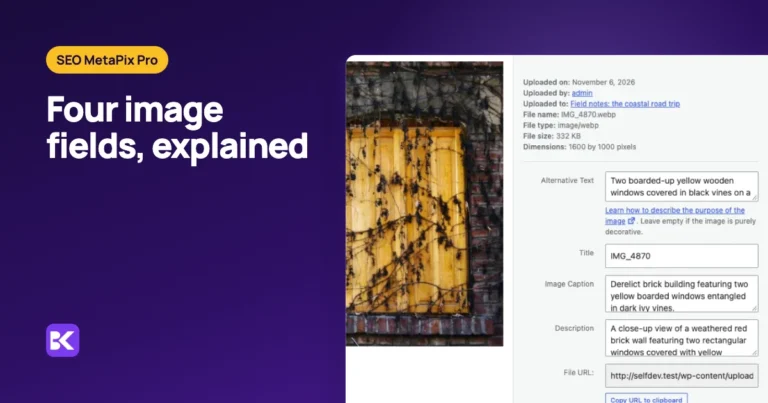
WordPress image metadata is four text fields: alt text, title, caption and description. This guide covers what each does, which one Google and screen readers use, what WordPress reads from EXIF and…

Find every WordPress image with missing alt text and fill the empty fields in bulk, from file names or AI, without overwriting descriptions your team already wrote.

Keep alt text your team wrote by hand. See which bulk and AI actions skip existing descriptions, which replace them on purpose, and how to test before a large run.
Set-up, every setting, and the hooks for developers.
Read the docs →A private WordPress with the plugin installed, opened by a one-time email link and deleted when you leave.
Open the playground →2 articles — guides and release notes for this plugin.
Open the blog →What has shipped, what is being made ready now, and what comes next.
See the roadmap →ByteKeel PixTag · free forever
Enter your email: we create a free ByteKeel account with the download. Running it needs no key or account.
Your email address
Only used for your licence and account. No newsletter unless you ask for it.
Or try ByteKeel PixTag in the playground first