Skip to content

Black Friday 50% off your first year on all premium plugins and the Suite.

See the deals

ByteKeel PixTag ProAI alt text plugin for WordPress · Premium

AI alt text plugin for WordPress: AI alt text, approved by you.

ByteKeel AI looks at each picture and suggests its alt text, SEO title, caption and description. You review, then apply.

Black Friday: 50% off your first year. Ends 1 December.

  • ByteKeel AI built in
  • You approve every change
  • 30-day refund
Powered by ByteKeel AI
ByteKeel PixTag Pro AI review screen: ByteKeel AI suggestions for a photo’s alt text, SEO title, caption and description, each with an Apply box and an Overwrite box for fields that already have a value.
Real screen from ByteKeel PixTag Pro: suggestions wait for your approval before anything is saved.
ByteKeel PixTag Pro previewing AI-generated alt text, title, caption and description in WordPress
Review AI-generated image metadata before applying it to the WordPress Media Library.
See it working

The image SEO plugin that lets you decide.

Every screen below is a real screenshot of the current ByteKeel PixTag Pro in WordPress.

Four SEO fields, previewed first.

ByteKeel AI looks at each picture and suggests its alt text, SEO title, caption and description in one job, for one credit. Nothing is saved until you apply it, and a field you already filled is only replaced when you tick Overwrite.

  • Each field written for its own purpose
  • Apply field by field, or all completed at once
  • Suggestions to review, not guaranteed compliance
The ByteKeel AI screen in ByteKeel PixTag Pro: a photo with its current values and the AI suggestions for alt text, title, caption and description, each with an apply box.

Automatic on every upload.

Upload as you always do. A few seconds later each image has AI alt text, even when the file is called “IMG_4821”. Uploads never wait for the AI, and anything you edited yourself is left alone.

  • Runs in the background
  • Works on camera file names
  • Retried automatically if ByteKeel AI is busy
The WordPress Media Library list view after uploading photos with camera file names: the Alt Text column shows each one filled in by ByteKeel AI.

Managed AI, or your own key.

ByteKeel AI is connected by default, so there is no AI account to set up. It writes four separate texts per image. Prefer OpenAI or Anthropic? Add your own key; it writes the alt text, used for the other fields too, billed by your provider.

  • Connected out of the box
  • Switch to OpenAI or Anthropic any time
  • Test the connection in one click
ByteKeel PixTag Pro Generation Rules: AI provider set to ByteKeel AI, status Connected, with a Test connection button.

Fix the whole back catalogue.

Filter to images missing alt text, a date range or a post type, see the estimate, preview five results, then run in batches. Pause for lunch and resume where it stopped.

  • Filters, estimate and a five-image preview
  • Batches with pause, resume and cancel
  • Only images missing alt text, by default
The ByteKeel PixTag Pro Bulk Processor: filter options, the estimated number of images, Preview (5 images) and Start Bulk Process.

Every post, every image, one screen.

The Image Manager lists posts with their images. Search, filter to missing alt text, edit inline or bulk edit, then export to CSV, fix it in a spreadsheet and import it back.

  • Filter by missing alt text or title
  • Inline and bulk editing
  • CSV export and import
The ByteKeel PixTag Pro Image Manager: posts with their images and alt text status, with search, filters, Bulk Edit, Export CSV and Import CSV.
Every image, every time

Clean words. No clicks.

ByteKeel PixTag Pro tidies every AI reply before it is saved, and can run on its own whenever images arrive.

The clean-up pass

The AI replies

"The image shows a golden retriever puppy running across a sunlit lawn."

ByteKeel PixTag Pro saves

A golden retriever puppy running across a sunlit lawn

  1. Wrapping quotes removed
  2. “The image shows” removed
  3. Capital first letter
  4. No full stop at the end
  5. Cut at a word to your limit

Example reply. The character limit is 125 unless you change it.

Auto-generation

  • AI vision
  • File name
  • Post-context template
  • Hybrid

Images that already have alt text are skipped unless you say otherwise. A busy AI service is retried, and nothing written by hand is overwritten.

Pricing

ByteKeel AI credits included.

Both plans have every feature. They differ in sites and in included ByteKeel AI credits. Extra credit packs from $1 are planned, not on sale yet.

Black Friday — 50% off your first year of an annual plan, until 1 December 2026, 00:00 UTC. Renews at the regular annual price unless cancelled.

Personal

1 WordPress website

$14.50 first year

Renews at $29/year unless cancelled

$29 a year

Renews at $29/year unless cancelled

$4 a month

Renews at $4/month unless cancelled

Or $4/month, billed monthly

Or $14.50 for the first year, billed yearly

Or $29/year, billed yearly

50 ByteKeel AI credits/month

  • Alt text, title, caption, description
  • Automatic on upload
  • Review before saving
  • Bulk, CSV and image manager
  • Optional own OpenAI or Anthropic key

Up to 30 credits per site a day.

Best value

Agency

Up to 25 WordPress websites

$34.50 first year

Renews at $69/year unless cancelled

$69 a year

Renews at $69/year unless cancelled

$9 a month

Renews at $9/month unless cancelled

Or $9/month, billed monthly

Or $34.50 for the first year, billed yearly

Or $69/year, billed yearly

250 ByteKeel AI credits/month

  • Alt text, title, caption, description
  • Automatic on upload
  • Review before saving
  • Bulk, CSV and image manager
  • Optional own OpenAI or Anthropic key

One pool for all sites. Up to 30 credits per site a day.

Prices in USD, excl. VAT/sales tax, added at checkout by Paddle, our merchant of record. Own-key AI use is billed by your provider. 30-day refund policy.

Full pricing details and FAQ →

Compared

ByteKeel PixTag Pro and other AI alt text services

Entry plans side by side. Currencies, billing periods and credit amounts differ, so read each row in full.

  • Lower annual entry price than the compared services.
  • Fewer included credits at entry level: 50 a month on Personal (1 credit = 1 image).
  • Extra credits from 2.4¢ per image, once packs go on sale.
  • Four metadata fields, WordPress workflow tools and optional BYOK in one plugin.
Entry plans of ByteKeel PixTag Pro, AltText.ai, ImageSEO and AltText.io
ItemByteKeel PixTag ProPersonalAltText.aiBronzeImageSEOStarterAltText.ioSilver
Entry price$29 a year or $4 a month (USD)$49 a year or $5 a month€47.99 a year or €4.99 a month (EUR)$19 a month (no annual price listed)
Included ByteKeel AI credits50 credits a month (Agency: 250 a month, shared). 1 credit = 1 image, all four fields1,200 a year on yearly billing (100 a month on monthly)100 a month, reset monthly600 a month
Extra credits25 for $1, 100 for $3, 250 for $6 (2.4–4¢ each; not on sale yet)50 for $3 (6¢ each)500 for €19.99 (about 4 euro cents each)Offered; price not listed
WordPressWordPress pluginWordPress pluginWordPress pluginWordPress plugin
Fields writtenAlt text, SEO title, caption, descriptionAlt textAlt text, file namesAlt text, titles, descriptions
Use your own AI keyYes: OpenAI or Anthropic, billed by your providerNot listedNot listedNot listed
Workflow toolsReview before saving, bulk with preview/pause/resume, image manager, CSV, unused-media cleanupBulk generation, CSV import/exportBulk alt text from the Standard planBatch processing

Prices checked 6 November 2026 on each vendor’s official pricing page. Competitor prices may change. Product names belong to their owners. Official pricing pages: AltText.ai, ImageSEO, AltText.io.

ByteKeel PixTag vs ByteKeel PixTag Pro

Why choose Pro?

ByteKeel PixTag writes alt text from names and context, on your server. ByteKeel PixTag Pro adds ByteKeel AI that looks at the picture and suggests all four SEO fields, plus the tools for a whole library.

In both

  • From file names
  • From post context (templates)
  • Media Library alt-text column
  • Media Library bulk action
  • Skips alt text you wrote by hand
  • Coverage dashboard
  • Developer hooks
ByteKeel PixTag and ByteKeel PixTag Pro, current versions — feature comparison.
CapabilityByteKeel PixTagFreeByteKeel PixTag ProThis page
Writing alt text
AI that describes the imageNo (local generation only)ByteKeel AI credits included monthly, or your own OpenAI / Anthropic key
ByteKeel AI credits includedNone50 a month (Agency: 250, shared)
Review suggestions, confirm each fieldNot includedIncluded
Your own AI promptNot includedIncluded
Automatic on uploadNot includedIncluded
Automatic on post saveNot includedIncluded
Fields writtenAlt text, titleAI suggests alt text, SEO title, caption and description
File-name rules, blocked words, prefix and suffixDefaultsFully editable
Working at scale
Bulk processorBasic: missing alt or every image; stopAdvanced: date, post type and post filters; preview
Images per runNo limitNo limit (batches of up to 100)
Images per dayNo limitLocal: no limit. ByteKeel AI: up to 30 per site per UTC day while credits remain. Own key: your provider’s limits
Daily usage counterNot includedIncluded
Pause and resume a bulk runNot includedIncluded
Image manager: edit alt text post by postNot includedIncluded
CSV export and importNot includedIncluded
Find and delete unused imagesNot includedIncluded
Site and privacy
Runs without any external serviceIncludedExcept when AI is used
Personal data removed before AINot includedIncluded
PriceFreeFrom $29 a year

ByteKeel PixTag Pro is a separate plugin and does not need ByteKeel PixTag: with an active licence it takes over ByteKeel PixTag’s settings and turns ByteKeel PixTag off. Without an active licence its features are locked until you activate or renew, and it does not turn the free ByteKeel PixTag off, so that plugin can run with no limits (if ByteKeel PixTag Pro turned it off while licensed, switch it back on from the licence notice). AI uses ByteKeel AI (50 credits a month on Personal, 250 shared on Agency, up to 30 credits per site a day) or your own OpenAI or Anthropic key.

Questions

ByteKeel PixTag Pro questions

ByteKeel PixTag Pro is a paid WordPress plugin that writes alt text, a title, a caption and a description for each image with the built-in ByteKeel AI (credits included each month) or your own OpenAI or Anthropic key, in bulk with a review step or on upload.

Something not covered here? Write to us.

One credit processes one standard image (JPEG, PNG, GIF or WebP up to 5 MB) and returns its alt text, SEO title, caption and description in one job. Personal includes 50 credits a month; Agency includes 250 a month, shared across its 25 sites.

Every month on the anniversary of your licence’s billing date (for example the 15th if you bought on the 15th), not on the 1st. Included credits are used before purchased credits, and unused included credits do not carry over. The ByteKeel AI screen in the plugin shows the next renewal date.

ByteKeel AI processes up to 30 images per site per UTC day, and only while the account has included or purchased credits. It is a processing safety limit, not 30 free images a day.

Extra packs are planned: 25 credits for $1, 100 for $3 and 250 for $6. They are not on sale yet. Until then, connect your own OpenAI or Anthropic key for more volume.

Purchased credits do not expire while your ByteKeel account exists. They need an active ByteKeel PixTag Pro licence to be used; after a renewal, unused credits work again.

No. Included ByteKeel AI credits need no separate AI account or key. You can connect your own OpenAI or Anthropic key instead; that usage is billed by your provider, subject to its pricing and limits, and does not use ByteKeel credits.

Only when AI is used, and only with an active licence. With ByteKeel AI, the default, the image file (up to 5 MB) goes to ai.bytekeel.com, which passes it through OpenRouter to an AI model whose provider handles it under its own terms and may log it. ByteKeel AI deletes the image as soon as the job ends and the result within 24 hours; no prompt, file name, page content or visitor data is sent. With your own OpenAI or Anthropic key the image goes to that provider under its terms, and ByteKeel does not receive it. Details are in the privacy policy.

No. Suggestions are previewed, a filled field is only replaced when you tick Overwrite for it, and background jobs only replace text the plugin wrote itself.

No. It is a suggestion you can review and edit. Good alt text depends on the image’s purpose on the page, which only you know.

ByteKeel PixTag uses no AI: it writes alt text locally from file names and post context, from the Media Library or a basic bulk processor, with no per-run or daily limit. ByteKeel PixTag Pro adds ByteKeel AI that looks at the picture and suggests all four fields, automatic generation on upload, an advanced bulk processor, an image manager, CSV export and import, and the unused-media cleanup.

A cancelled licence keeps everything, ByteKeel AI included, until its paid-through date. After that ByteKeel PixTag Pro’s features are locked until you renew. The free ByteKeel PixTag can write file-name alt text again, with no limits: switch it back on from the link in ByteKeel PixTag Pro’s licence notice. Nothing already written or set is lost.

Personal is $29 a year or $4 a month for one website. Agency is $69 a year or $9 a month for up to 25 websites. Both plans have every feature; they differ in sites and in included ByteKeel AI credits.

From the blog

Image SEO guides

Step-by-step guides, tested on real sites, with the versions we used.

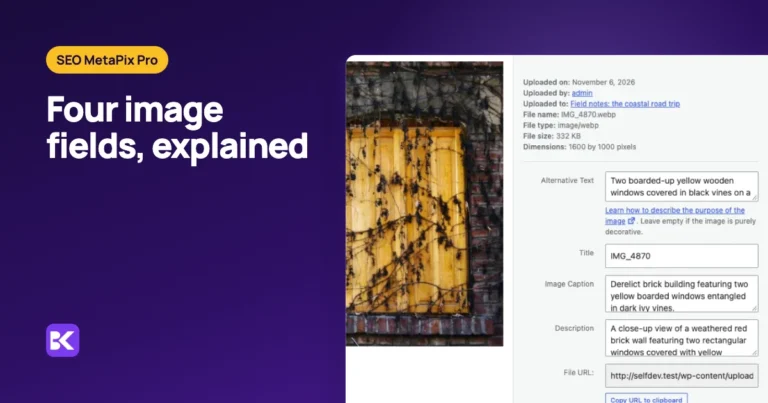
  • WordPress image metadata, explained: ByteKeel PixTag Pro label and the headline "Four image fields, explained" beside a close-up of the WordPress Attachment details panel for a photo of two boarded-up yellow windows on a brick wall, with Alternative Text, Title (IMG_4870), Image Caption and Description filled in, and a Regenerate Alt Text button from ByteKeel PixTag Pro

    ByteKeel PixTag Pro · 9 Nov 2026 · 7 min read

    WordPress image metadata, explained

    WordPress image metadata is four text fields: alt text, title, caption and description. This guide covers what each does, which one Google and screen readers use, what WordPress reads from EXIF and…

  • How to bulk add missing alt text in WordPress: ByteKeel PixTag label and the headline "Bulk add missing alt text" beside a close-up of ByteKeel PixTag Bulk Processor results listing image filenames, generated alt text and a file that could not produce useful alt text

    ByteKeel PixTag · 4 Nov 2026 · 7 min read

    How to bulk add missing alt text in WordPress

    Find every WordPress image with missing alt text and fill the empty fields in bulk, from file names or AI, without overwriting descriptions your team already wrote.

  • Protect hand-written alt text: ByteKeel PixTag label and the headline "Protect hand-written alt text" beside a close-up of wordPress Media Library list view with the ByteKeel PixTag Alt Text column showing which images have alt text

    ByteKeel PixTag · 4 Nov 2026 · 6 min read

    Protect hand-written alt text

    Keep alt text your team wrote by hand. See which bulk and AI actions skip existing descriptions, which replace them on purpose, and how to test before a large run.

Resources

Learn ByteKeel PixTag Pro

Playground

A private WordPress with the plugin installed, opened by a one-time email link and deleted when you leave.

Open the playground →

Describe your whole library, on your terms.

Managed AI built into WordPress, all four SEO fields, preview before saving. Start with the playground or read the documentation.