Documentation
Set-up, every setting, and the hooks for developers.
Read the docs →Black Friday 50% off your first year on all premium plugins and the Suite.
See the deals
ByteKeel Order ProfitWooCommerce profit plugin · Free
Stores each product’s cost and shows the profit and margin of every order, right in the order list.
What the order earned
An example order with example fee and packaging settings, worked out with the plugin’s own formula.

The same settings the plugin has. Change them and see what the example order really earned.
Settingsas in the plugin
The example order2 mugs at $15.00, $4.00 shipping, $6.80 VAT. Order total $40.80.
Profit = revenue − product costs − payment fee − packagingMargin = profit ÷ revenue × 100
What you pay the carrier is not known to the plugin; add an average to Packaging to include it. Refunds are always deducted.
No new habit. The numbers appear in the WooCommerce screens you open every day.
| Order | Status | Total | Profit |
|---|---|---|---|
| #1042 | Processing | $40.80 | $16.0253.4% |
| #1041 | Completed | $96.00 | $41.0251.3% |
| #1040 | Completed | $24.00 | $13.7068.5% ! |
| #1039 | On hold | $58.50 | – |
| Revenue | $30.00 |
| Product costs | −$12.00 |
| Payment fee | −$1.48 |
| Packaging | −$0.50 |
| Profit | $16.02 |
| Margin | 53.39% |
| Name | Price | Cost | Margin |
|---|---|---|---|
| Stoneware mugVariable | $12.00 – $22.00 | $5.00 – $9.50 | 56.8% – 60.0% |
| Linen toteSimple | $18.00 | $7.20 | 60.0% |
| Coaster setSimple | $10.00 | – | – |
Set a default on the product and override it only where a variation costs you more or less.
Stoneware mug
Variable product
The product’s Profit tab shows this estimate per variation, at the current price excluding tax. Order profit uses the price actually paid.
Set a cost from the products list, or change hundreds at once.
Each order keeps the unit costs it was first calculated with, and every change is logged. Recalculate when you want today’s costs applied.
Today, the last 7 and 30 days at a glance. Any date range in Reports. One click to a spreadsheet.
Today 3 orders
Last 7 days 21 orders
Last 30 days 84 orders
Top products by profit (30 days)
Profit reports
One row per order, every order in the range.
| Order | Date | Status | Currency | Revenue | Product costs | Payment fee | Packaging | Total cost | Profit | Margin % | Items without cost |
|---|---|---|---|---|---|---|---|---|---|---|---|
| 1042 | 2026-11-04 10:12 | Processing | USD | 30.00 | 12.00 | 1.48 | 0.50 | 13.98 | 16.02 | 53.39 | 0 |
| 1041 | 2026-11-04 09:47 | Completed | USD | 80.00 | 35.40 | 3.08 | 0.50 | 38.98 | 41.02 | 51.27 | 0 |
| 1040 | 2026-11-03 18:05 | Completed | USD | 20.00 | 4.80 | 1.00 | 0.50 | 6.30 | 13.70 | 68.52 | 1 |
ByteKeel Order Profit is a free WooCommerce plugin that stores a cost of goods for each product and variation and shows the profit and margin of every order, with refunds handled, reports and CSV export.
Something not covered here? Write to us.
Yes. Enter your email address in the form on this page: the download arrives in a free ByteKeel account. Free — no licence key or account is required to use the plugin. Install it from the zip and update it the same way when a new version is out.
Revenue is the order total minus refunds, tax and the shipping charged to the customer (tax and shipping can be changed in Settings). Profit is revenue minus each item’s unit cost times the quantity sold, the payment fee (a percentage of the order total plus a fixed amount) and the packaging cost. A refunded item’s product cost is removed only when the item is returned to stock; refunded without restocking, the cost stays, so damaged or non-returned items do not overstate profit. Margin is profit divided by revenue.
Yes. Every variation has its own cost field. Leave it empty and the variation uses the parent product’s cost.
Yes. Every screen works straight away: there is no licence key, no account and no usage limit.
No. Orders keep the unit costs they were first calculated with. Recalculate one order, or all orders from the dashboard, to apply today’s costs.
The plugin does not know your carrier cost. Add an average to the packaging cost if you want it in the profit figure.
Yes. The Reports tab exports the orders of any period as a CSV file, one row per order, with revenue, product costs, payment fee, packaging, total cost, profit and margin.
Yes. It declares compatibility with WooCommerce’s High-Performance Order Storage and also works with classic order storage.
No. Everything is calculated and stored in your own database, and the plugin makes no outside requests.
Step-by-step guides, tested on real sites, with the versions we used.
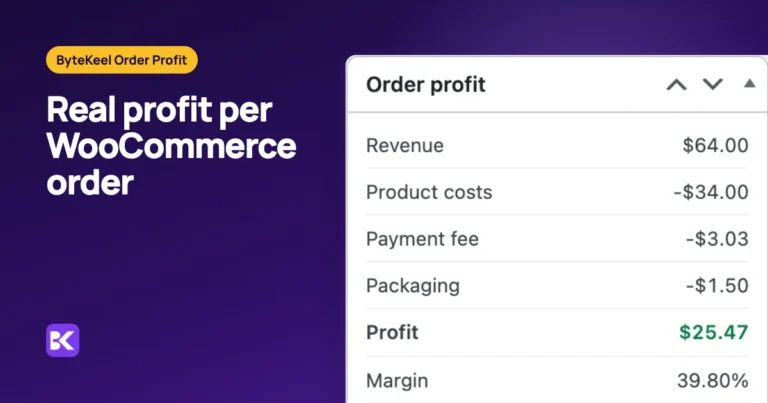
The WooCommerce order screen shows what the customer paid, not what the order made after product cost, fees and refunds. Here is the formula, a worked example with a partial refund, and…
Set-up, every setting, and the hooks for developers.
Read the docs →A private WordPress with the plugin installed, opened by a one-time email link and deleted when you leave.
Open the playground →1 article — guides and release notes for this plugin.
Open the blog →What has shipped, what is being made ready now, and what comes next.
See the roadmap →ByteKeel Order Profit · free forever
Enter your email: we create a free ByteKeel account with the download. Running it needs no key or account.
Your email address
Only used for your licence and account. No newsletter unless you ask for it.
Or try ByteKeel Order Profit in the playground first