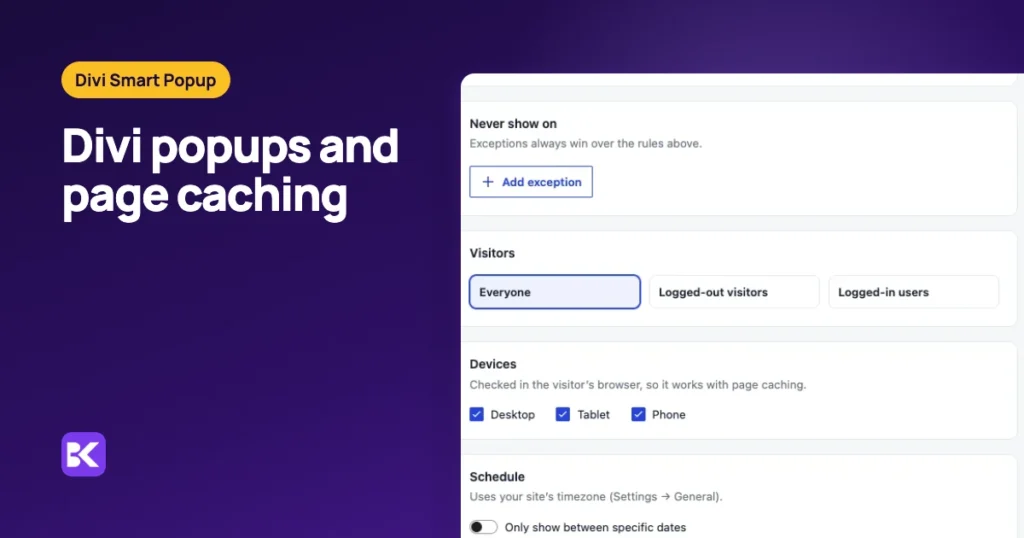
In short:
- Keep the page cache: you rarely need to disable it for a Divi popup.
- Browser-side rules are safe: triggers, devices and frequency limits run after the page arrives, so cached pages respect them.
- Build-time rules need care: page targeting, login state and schedules are decided when WordPress builds the page, so the cached copy decides until it is cleared.
- Speed cost is per popup: pages without a matching popup load no popup files; each matching popup adds a full Divi layout.
Why a cached page can ignore a popup rule
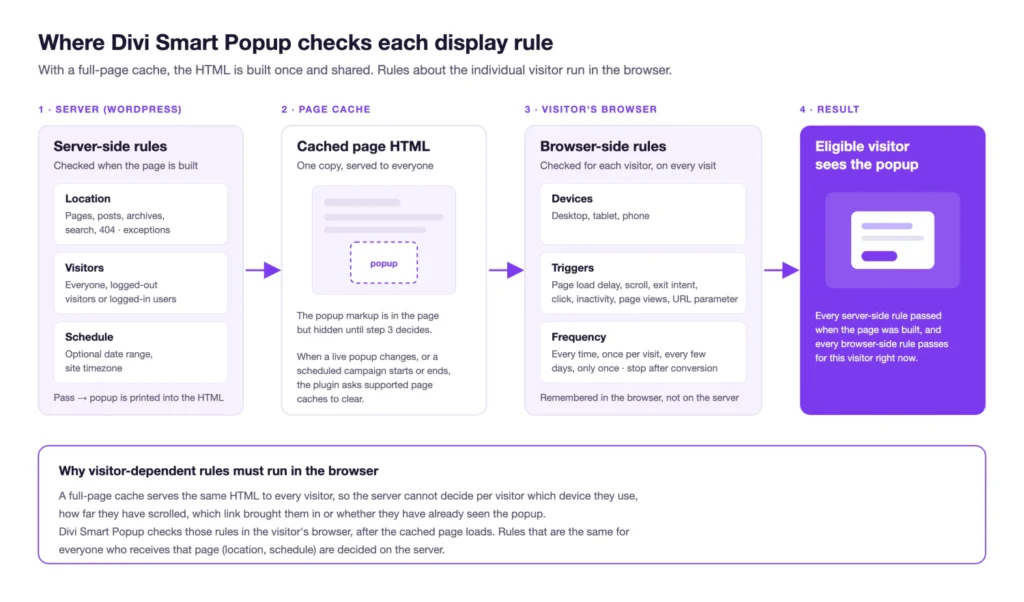
A cached page can ignore a popup rule because the cache stores a finished page and serves that copy again. If a rule was decided while the page was built, the stored copy keeps that decision until the cache is refreshed. So the useful question is where each rule is decided, not whether popups and caching are compatible.
The fastest way to see which rule blocks a cached popup
The quickest check is to view the page as WordPress builds it now, not as the cache stored it. That is hard by hand, because you usually test while logged in, which most caches skip.
We built Divi Smart Popup at ByteKeel to take that guesswork out. Check campaign in the popup editor opens the page in test mode and lists the rule that blocks the popup. Previews and test mode send no-cache headers, so a shared cache never keeps them.
You can try it on a private WordPress in the ByteKeel playground. If you are fixing this without a plugin, the manual checks follow.
Which popup rules survive page caching?
Rules decided in the visitor's browser survive any cache. Rules decided while WordPress builds the page depend on the stored copy. Divi Smart Popup splits them like this:
| Decided in the browser | Decided when the page is built |
|---|---|
| Triggers: delay, scroll, exit intent, click, inactivity, page views, URL parameter | Pages, posts, archives, terms, authors, search and 404 rules |
| Devices (by screen width) | Logged-in or logged-out, and user role |
| Frequency, total caps, hide after close, stop after conversion | Schedule (start and end dates), checked again in the browser since 2.1.4 |
| Site-wide limits per visit and cooldown | Whether the popup is active at all |
A frequency cap or a phone-only popup behaves the same on a cached page as on an uncached one. Rules in the right column decide which popups are printed into the page, and the stored copy keeps them until the cache is cleared.
Targeting by page caches cleanly. A popup aimed at a page, a post type, a category or the whole site is safe, because every visitor to that address should see the same popups.
Do logged-in popup rules work with page caching?
Yes, if your cache skips logged-in users. A popup for members or a role is decided on the server. If one cached copy goes to logged-in and logged-out visitors alike, whoever filled the cache decides what everyone sees.
Most cache plugins, TurboCache included, do not cache pages for logged-in users by default. If yours does, set it up as you would for any member-only content.
Why does a scheduled popup show after its end date?
The cached copy was stored while the campaign was still live. Divi Smart Popup 2.1.4 changed two things to stop that:
- The browser rechecks dates: a cached page printed before the end date still carries the popup, but the browser sees the campaign has ended and keeps it closed. Clicks and links cannot open it either.
- Common caches are cleared: when a live popup is switched on, edited, switched off or deleted, and at a scheduled start and end. This covers TurboCache, WP Rocket, LiteSpeed Cache, W3 Total Cache, WP Super Cache, SiteGround's caching plugin, Cache Enabler, Breeze, Hummingbird, Nginx Helper and WP Fastest Cache.
Two limits remain. Scheduled clearing uses WP-Cron, which runs on the next visit after the time, so on a quiet site a campaign can start a few minutes late. A server, host or CDN cache the plugin does not know still needs clearing by hand, or a developer can hook the d5pe_purge_page_cache action.
We tested the clearing calls in the plugin's own test suite, but have not yet run every listed cache plugin end to end.
How to fix a popup on a cached page
Work through these checks fastest first. They apply to any popup on a cached Divi page:
- Clear the page cache: after switching the popup on or editing it, clear the cache once.
- Test logged out: open the target page in a private window and confirm the popup opens with its trigger.
- Reload once: the frequency rule should now keep it away, which proves browser-side rules work on the cached copy.
- Check schedules after the end: load the page shortly after the end time. The popup must stay closed even if the cached copy is older.
- Undo script changes: if combining, deferring or delaying scripts stopped the popup, undo that change and clear every cache. Then exclude
divi5-popup-engine/assets/js/popup.jsby hand in that tool, checking the name in the browser Network panel. - Clear host and CDN caches: purge any server or CDN layer by hand after a campaign change.
Divi Smart Popup adds no marker that tells optimisation plugins to skip its script, and we have not tested it against them. Our guide to delaying JavaScript on Divi safely covers what else to leave alone.
What a popup costs in page speed
We profiled a Divi 5 page with 0, 1, 10 and 100 published popups, with a warm object cache, and took the median of seven runs.
| Published popups matching the page | Choosing popups | Popup CSS and JS loaded? | Popup markup |
|---|---|---|---|
| 0 | 0.6 ms, 1 query | No | None |
| 1 | 0.5 ms, 1 query | Yes | 1 popup, about 21 ms to render |
| 10 | 1.2 ms, 1 query | Yes | 10 popups, about 170 ms to render |
| 100 aimed at another page | 5.2 ms, 1 query | No | None |
- Unmatched pages pay almost nothing: no popup stylesheet, script or markup is added. We confirmed this in the browser's network log as well as on the server.
- Matching popups cost render time: each one is a full Divi layout, roughly 17–21 ms on our test machine. Aim each campaign at its own pages rather than the whole site with exceptions.
- A cache pays it once: with a page cache in front, that render cost is paid once per cached copy, not per visitor.
Manual cache handling vs Divi Smart Popup
You can keep popups and caching in step by hand. The plugin mostly saves you the clearing and the guessing.
| Criterion | Manual approach | Divi Smart Popup |
|---|---|---|
| Frequency and device rules | Only safe if your own code runs them in the browser | Run in the browser on cached pages |
| Schedule end on an old cached copy | Purge by hand at the end time | Browser rechecks the end date |
| Clearing after edits | Remember to purge every time | Asks 11 common page caches to clear |
| Host or CDN cache | Purge by hand | Purge by hand, or hook the action |
| Finding the blocking rule | Private windows and trial and error | Check campaign in test mode |
| Cost | Free | $29 a year for one site |
When you do not need Divi Smart Popup: you run one click-to-open popup with no schedule, login or frequency rules. A native Divi 5 popup is part of the page itself, so a cache stores it like any other section.
How to keep popups working on cached pages
- Test in a private window: after every popup, cache or optimiser change.
- Skip logged-in users: keep your cache off for logged-in visitors if any popup targets a role.
- Exclude the popup script: whenever you add a combine, defer or delay tool.
- Purge outer caches: clear host and CDN caches when a scheduled campaign starts.
For exact compatibility details, see the caching reference and the schedule reference. To build targeted campaigns that load nothing on unrelated pages, see Divi Smart Popup.
Frequently asked questions
Should popup pages bypass the page cache?
Usually no. Bypassing every page that can show a popup removes much of the benefit of caching. Keep browser-side rules in the browser and purge only when a build-time change needs it.
Why is my Divi popup not showing on a cached page?
Usually the cached copy was stored before you switched the popup on, or a script optimiser broke it. Clear the cache, test logged out, then undo recent script changes.
Do inactive popups slow down unrelated pages?
In our test, no. Pages without a matching popup received no popup markup, stylesheet or script, even with 100 popups aimed elsewhere. Recheck the Network panel after major plugin updates.
More about Divi Smart Popup
-

Best Divi 5 popup plugin? Compared by use case
Divi 5's Interactions handle click-to-open popups for free. Once a popup should open by itself, on chosen pages and not on every visit, a plugin earns its place. Here is how the…
-

Build a Divi 5 popup campaign without code
Divi 5 opens a popup on click, but cannot decide when one opens by itself, where, or how often. Build the native click popup, then a full campaign in the Divi Builder.
Leave a Reply