
In short:
- Native Divi 5: click to open, a time delay, or a module scrolling into view. There is no exit intent, no once-per-visit rule and no statistics.
- A Divi popup plugin: you still design in Divi, and the plugin decides when, where and how often the popup opens.
- A general popup or opt-in plugin: works with any theme, with its own editor. Check what it says about Divi 5.
- No single best plugin: the right one depends on your Divi version, how many popups you run and which rules you need.
The fastest way to see what a popup is doing
Once a popup has a trigger, page rules and a frequency rule, the hard part is knowing which rule stops it on a given page. Natively, you check each condition, cookie and cache by hand.
We built Divi Smart Popup at ByteKeel to remove that guesswork. Its Check campaign button opens a page you choose in a test mode only you can see. It lists every rule for that page as Passed, Waiting, Warning or Blocked, with a link to the setting to change.
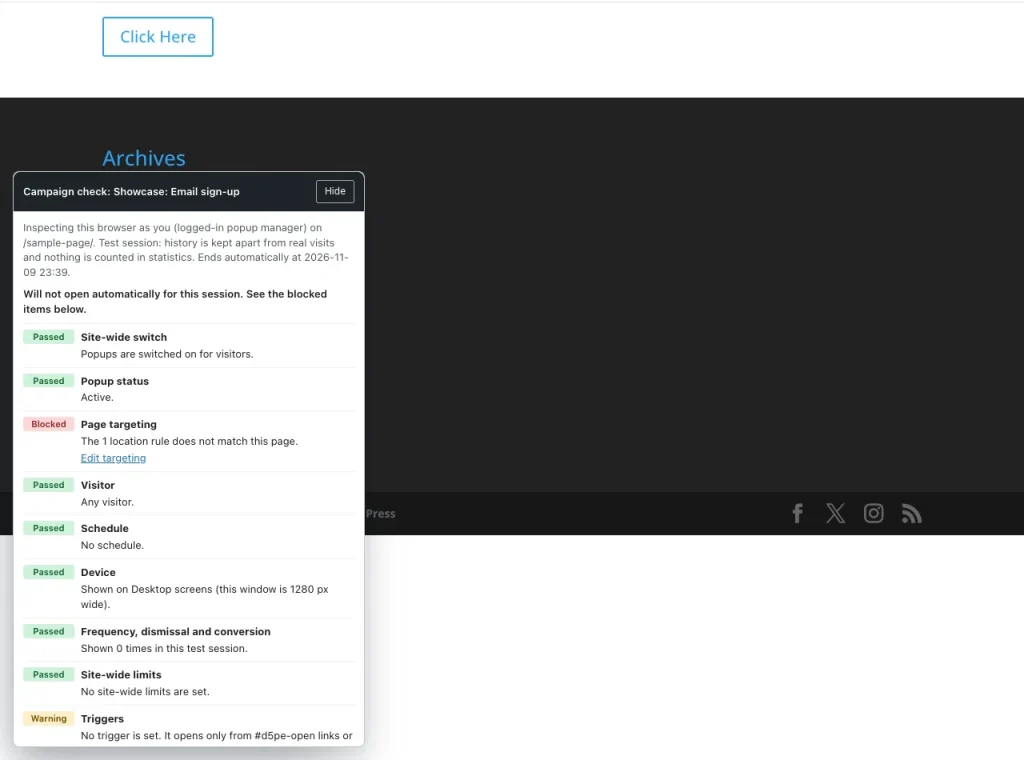
You can try it on a private WordPress in the ByteKeel playground. If you are building natively in Divi 5, here is how, followed by how the other plugins compare.
Disclosure: ByteKeel makes Divi Smart Popup. Divi Life, which sells Divi Overlays, has also owned Popups for Divi and Divi Areas Pro since it acquired Divimode in October 2024. Competitor facts come from each product's own page, WordPress.org listing or public support forum, checked on 14 November 2026 (Bloom on 10 November 2026).
The best Divi 5 popup option for each job
- One click-to-open popup: native Divi 5 (Canvases and Interactions). No plugin and no extra cost.
- Free click or exit-intent popup: Popups for Divi, free on WordPress.org. Its free version has no page-load trigger, targeting or frequency control, and its support forum has open Divi 5 reports.
- WooCommerce page placement: Divi Areas Pro, which can show areas on product, cart and checkout pages and lists Divi 5 support since version 3.2.0 (March 2026).
- Divi 4 and Divi 5 together: Divi Overlays, sold on the Divi Marketplace, with schedules.
- One tool across builders: Popup Maker, with a free core. Divi Visual Builder editing arrived in 1.25.0; exit-intent and scroll triggers are paid.
- Many Divi 5 campaigns: Divi Smart Popup (ours), for automatic triggers, page, visitor and schedule targeting, frequency rules, and files that load only where a popup can open. Divi 5 only and paid.
How to make a popup in Divi 5 without a plugin
Divi 5 has no popup manager, but a hidden section and Interactions do the job. Elegant Themes' tutorial How To Design Popups In Divi 5 (Three Different Ways) (22 March 2026) describes this method and a canvas-based one. We built it on Divi 5.2.0; it worked on desktop and a phone-sized touch screen:
- Build the popup section: add a section with your content and give it an admin label such as Popup.
- Fix its position: in Advanced › Position, choose Position Fixed, the centre Offset Origin and a high Z Index (we used 99999).
- Hide it by default: in Advanced › Visibility › Disable On, switch on Desktop, Tablet and Phone.
- Open it from a button: in the button's Advanced › Interactions, add trigger Click, Effect Action Show Element, Target Module Section (Popup).
- Add a close button: inside the popup, add Click › Hide Element › Section (Popup), then test in a private window.
- Optional delay: add a Load interaction with a Time Delay, such as 5000 ms, on a module that is always on the page.
- Optional "do not show again": add Click › Add Cookie to the close button, and a Cookie Does Not Exist condition to the section.
The full walkthrough with screenshots is in How to create a Divi 5 popup without a plugin. Here is where the native method stops:
- No exit intent: Elegant Themes talks about "exit-intent-style" offers built from Interactions, conditions and cookies, not a ready-made trigger.
- No scroll percentage: you can react to a module entering the viewport, but there is no "scrolled 50%" setting.
- One fixed cookie: in Divi 5.2 it lasts a year. The condition is checked on the server, so a full-page cache can still serve the popup to people who closed it.
- No backdrop or easy closing: there is no dimmed backdrop, Escape-key closing or click-outside closing.
For a size guide or a booking form that opens only when asked, that is often enough. A plugin earns its place once the popup has to decide for itself: exit intent, once per visit or every seven days, targeting by page type or role, several popups with one priority order, or views and conversions.
Divi 5 popup options compared
"Divi 5 support as stated" means what each product's page, changelog or listing said on the dates above. We did not install or test the third-party products.
| Approach | Design tool | Divi 5 support as stated | Targeting and frequency | Cost as published |
|---|---|---|---|---|
| Native Divi 5 (Canvases, Interactions) | Divi 5 Visual Builder | Built in | Element conditions; one click-set cookie (one year in Divi 5.2, our test) | Included with Divi ($89 billed yearly on the Elegant Themes join page) |
| Popups for Divi (Divimode, owned by Divi Life) | Any Divi section marked "This is a Popup"; no admin screen | Changelog 3.2.0: "Full Support Divi 5"; 3.2.9 (October 2026): "Improve: Divi 5 compatibility". Open Divi 5 reports in its forum | None in the free version; click and desktop exit intent only (page load needs a code snippet, per the author) | Free (WordPress.org, 100,000+ active installations as listed) |
| Divi Areas Pro (Divimode, owned by Divi Life) | Divi Visual Builder, or global popups in its own admin area | Changelog 3.2.0, 2 March 2026: "Support Divi 5" | Pages and posts, device, user role, URL parameter, referrer, date ranges, weekly schedule; "Keep Closed" for a set period | $89 a year (Single Site), $169 a year (Unlimited) |
| Popup Maker | Its own popup editor (block editor by default) | 1.25.0 changelog (September 2026): "complete Divi support… including Visual Builder editing" | Display rules and cookie frequency free; exit intent, scroll, scheduling and advanced targeting are Pro | Free core; Pro $99 a year, Pro+ $249 a year (WordPress.org listing) |
| Divi Overlays (Divi Life) | Divi Builder | Marketplace listing: "Compatible With Divi 4" and "Compatible With Divi 5" | Pages, posts, archives, custom post types; dates or weekly schedule; per-device triggers; close-button cookie | $79 on the Divi Marketplace (unlimited websites, one year of updates) |
| Bloom (Elegant Themes) | Its own design settings in the dashboard | Not stated on its site | Site-wide, post type, category or chosen pages; delay, scroll, inactivity, after commenting or purchasing | Included in Elegant Themes membership |
| Divi Smart Popup (ByteKeel) | Divi 5 Visual Builder, on a canvas sized like the live popup | Divi 5 only | Pages, post types, archives, categories, authors, login state, role, device, dates; every time, once per visit, every few days or once, with caps | $29 a year or $7 a month (Single Site); $59 a year or $12 a month (Multi Site) |
None of these needs code for a click popup. Bloom is an email opt-in plugin that Elegant Themes lists as a third way to make popups. "Not stated" does not mean "not supported", so ask the vendor before you buy.
Triggers at a glance
| Option | Delay | Scroll | Exit intent | Frequency control |
|---|---|---|---|---|
| Native Divi 5 | Yes | Element entering view | No | A cookie set by a click |
| Popups for Divi (free) | No | No | Desktop only | No |
| Divi Areas Pro | Yes | Yes (% or px) | Devices with a mouse | "Keep Closed" period |
| Divi Overlays | Yes | Yes (%) | Yes | Close cookie; once per page load |
| Popup Maker | Yes (free) | Pro | Pro | Cookie events, seconds to years |
| Divi Smart Popup | Yes | Yes (% or element) | Yes, plus a touch version for phones | Every time, per visit, every N days, once; caps |
All six support a click trigger. Third-party rows are as stated by each vendor or listing.
Sources
- Native Divi 5: Elegant Themes, Interactions in Divi 5 and Divi Canvases.
- Popups for Divi: WordPress.org listing and changelog; the author on the free version's click and exit-intent triggers; a contributor on exit intent on touch devices; the support forum.
- Divi Areas Pro: Divimode product page and changelog.
- Divi Overlays: Divi Marketplace listing and Elegant Themes product highlight.
- Popup Maker: WordPress.org listing, Divi integration page and trigger list.
What Divi Smart Popup adds
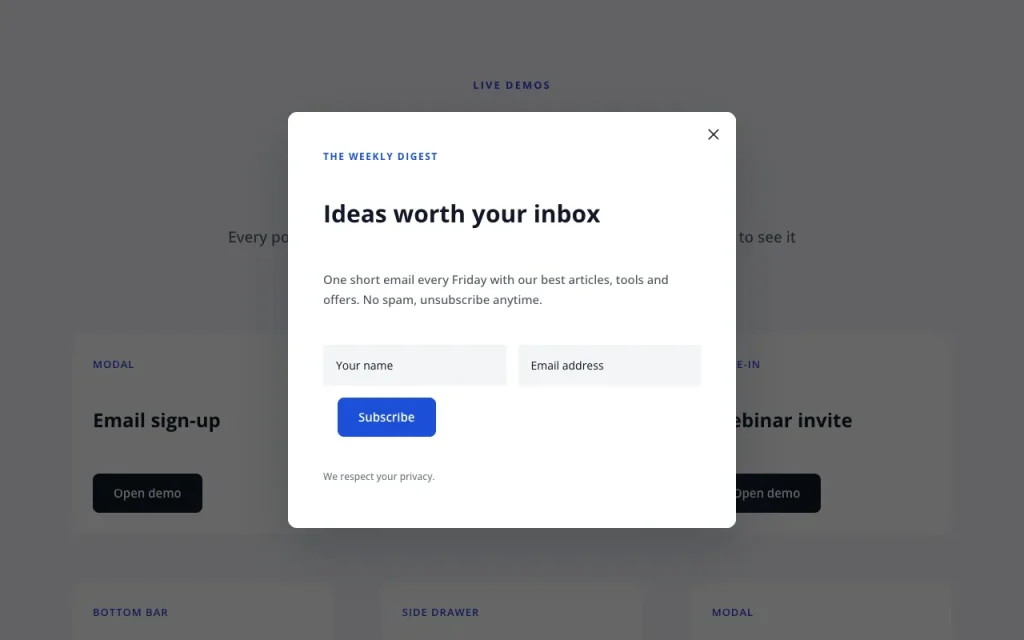
You build the popup with ordinary Divi modules, presets and global colours. A seven-step editor then sets the type, triggers, targeting, frequency, goals and priority, and a summary sentence reads back what you set.

- Seven popup types: modal, slide-in, top bar, bottom bar, full screen, left drawer and right drawer, with 37 templates and a blank canvas.
- Seven triggers: page load delay, scroll percentage or element, exit intent, click, inactivity, page views and URL parameter. Any link can also open a popup with
#d5pe-open-plus the popup's ID. - Exit intent on phones: inferred from a fast upward scroll after the visitor has read part of the page. We measured it in Does exit intent work on mobile?
- Targeting: page, post type, archive, category, author, search, 404, login state, role, device and dates. The date range is checked again in the browser, so schedules hold on cached pages.
- Frequency: every time, once per visit, every few days or once, plus caps, stop after a conversion and pause after a close. Kept in browser storage, not cookies.
- Statistics: anonymous daily views, closes and conversions per device. No IP addresses, and your own visits as a popup manager are not counted.
Does a popup plugin slow down a Divi page?
With Divi Smart Popup, a page where no popup can appear loads none of the plugin's files. We measured this on 14 November 2026 with Divi Smart Popup 2.1.7, Divi 5.2.0, WordPress 7.1.4 and PHP 8.5, in headless Chrome 157 at 1280 × 800 px, logged out, cache disabled. Three runs per page gave identical results.
| Page | Matching popups | Plugin files | Plugin bytes (uncompressed) | Page HTML |
|---|---|---|---|---|
| Sample page, popup excluded | 0 | 0 | 0 | 123,812 bytes |
| Same page, popup allowed | 1 | 2 (popup.js, popup.css) | 37,039 (29,909 + 7,130) | 161,478 bytes |
| Demo page, seven popups | 7 | 2 (same files) | 37,039 | 220,816 bytes |
The same two files load whether one popup matches or seven; with gzip, popup.js is about 9 KB. Each popup's Divi design is added to the HTML (37,666 bytes for one popup on our sample page), so switch off popups you no longer use.
Native Divi 5 vs Divi Smart Popup
| Criterion | Native Divi 5 | Divi Smart Popup |
|---|---|---|
| Automatic triggers | Delay and scroll-into-view; no exit intent | Seven triggers, including exit intent on phones |
| Frequency | One-year cookie set by a click | Per visit, every few days, once, caps |
| Targeting | Conditions added section by section | One set of page, visitor, device and date rules |
| Finding why it does not show | Check each rule and cache by hand | Check campaign and test mode |
| Cost | Included with Divi | From $29 a year; popups keep working if the licence lapses |
When you do not need Divi Smart Popup: you run one or two popups that only open on a click and you do not need numbers. Native Divi 5 costs nothing extra. On Divi 4, Extra or the standalone Divi Builder, it will not run at all, so choose a tool that states Divi 4 support.
It has no email service of its own (use Divi's Email Optin module or a form plugin inside the popup) and no A/B testing. Frequency is per browser, so a visitor on a new device can see a popup again.
How to keep Divi popups working after updates
- Test in a private window: your own closed-popup cookie or frequency record hides it from you.
- Clear caches in order: Divi › Theme Options › Clear CSS Cache, then plugin, host and CDN caches.
- Exclude the popup script: keep popup.js out of any combine, defer or delay setting.
- Switch off old popups: each one adds its design to the page HTML.
If a popup still does not open, Divi popup not showing? lists desktop and mobile checks. To run campaigns from the Divi Builder, see Divi Smart Popup and its pricing.
How we tested
- Hands-on, by ByteKeel: the native method on Divi 5.2.0 (desktop and a phone-sized touch screen), and Divi Smart Popup 2.1.6 and 2.1.7 on the same site. Raw load-test results are kept.
- Not tested: Popups for Divi, Divi Areas Pro, Divi Overlays, Popup Maker and Bloom. Their rows come from the sources listed above.
- Not compared: third-party speed, support quality, or anything their pages do not state. If a vendor fact is out of date, contact us and we will correct it.
Frequently asked questions
What is the best Divi 5 popup plugin?
It depends on the job. Native Divi 5 covers one click-to-open popup, and Popups for Divi a free click popup. Divi Areas Pro suits WooCommerce placement, Popup Maker several builders, and Divi Smart Popup, which we make, many Divi 5 campaigns with automatic rules.
Does Divi 5 have a built-in popup builder?
Not as a separate feature. You build a popup from a hidden section or canvas and open it with Interactions, which covers click, delay and scroll-into-view. It has no exit intent, no visit-based frequency and no statistics.
How do I make an exit-intent popup in Divi 5?
Divi 5 has no exit-intent trigger, so you need a plugin or your own script. Check whether it works on phones: Divi Areas Pro's page says its exit intent "works on all devices with a mouse", while Divi Smart Popup adds a touch version.
Can I use a Divi 4 popup plugin on Divi 5?
Only if the vendor says it supports Divi 5. Divi 5 is a rebuilt builder, so check the product page or changelog before you upgrade. Divi Areas Pro states it in its 3.2.0 changelog; Bloom's page does not mention Divi 5.
Is there a free version of Divi Smart Popup?
No. Single Site is $29 a year or $7 a month, and Multi Site $59 a year or $12 a month, with the same features. If a licence lapses, your popups keep working; native Divi 5 and Popups for Divi are the free options.
More about Divi Smart Popup
-

Build a Divi 5 popup campaign without code
Divi 5 opens a popup on click, but cannot decide when one opens by itself, where, or how often. Build the native click popup, then a full campaign in the Divi Builder.
-

Does exit intent work on mobile? We tested it
Classic exit intent needs a mouse pointer. See how a touch version reacts to a fast upward swipe, what our Divi 5 test measured and when another trigger is safer.
Leave a Reply