Divi popup not showing?
Why a Divi popup does not open on desktop or mobile, or stopped after an update: checks for native Divi 5 popups and Divi Smart Popup, fastest first.
Quick answer
Most Divi popups that “stop working” are fine — something is keeping them hidden. Four causes cover nearly every case:
- Your browser remembers you closed it — test in a private window
- A cached copy of the page is out of date — clear Divi’s CSS cache, then every other cache
- A rule doesn’t cover this device or page — check Disable On, devices and targeting
- Another script broke the page — look at the browser console
Tested on 4 November 2026 with Divi 5.2.0, WordPress 7.1.4 and Divi Smart Popup, in Chromium at desktop width (1280 px) and with a phone-sized touch screen (390 px). Elegant Themes’ current release at the time was Divi 5.18.2, which we have not tested: menu labels may have moved since 5.2. The Divi Smart Popup settings used here were checked against the 2.1.4 source code on 5 November 2026; releases since our test changed licensing, page-cache clearing and accessibility, not these steps.
Anything described as “in our test” was reproduced on those versions. General advice we didn’t reproduce is marked as such.
Start here: the 60-second check
Elegant Themes recommends the same cache order in Why the live page looks different from the Visual Builder.
Which kind of popup is it?
Native Divi 5 popup
A section shown and hidden with Interactions. Jump to Native Divi 5 popups.
Divi Smart Popup
Listed under Popups in the admin. Jump to Divi Smart Popup.
Another plugin
Follows its own rules, but the 60-second check above still applies.
Native Divi 5 popups
Never appearsall devices
Edit the button’s interaction and check Target Module points at the popup section. An admin label on the section (e.g. “Popup”) makes it easy to pick.
Appears for visitors, not for youcookie
If the section has a Cookie Does Not Exist condition and you clicked Close once, your browser has that cookie for a year — in our test Divi 5.2 set a 365-day expiry and left the section out of the page. Use a private window or delete the cookie.
Appears for some visitors, not otherscache
Divi checks conditions on the server. A page cache can store a copy built for someone with the cookie and serve it to everyone. Clear the cache; exclude the page or vary the cache on that cookie.
Your edits don’t showCSS cache
Divi caches generated CSS per page. In our test, a page changed outside the builder kept old CSS until Divi → Theme Options → Clear CSS Cache.
Works on desktop, not on phonemobile
Check all three Disable On switches. Interactions aren’t responsive — one set for all screens — so use separate modules or Breakpoint Enter/Exit for different phone behaviour.
Hover-opened popup does nothing on phonesmobile
Mouse Enter/Exit need a pointer. Use Click on touch screens. (General advice; we tested Click, not hover, on a phone.)
Popup cut off on a phonemobile
A fixed section taller than the screen can’t scroll into view. Add a max height and set Advanced → Visibility → Vertical Overflow.
Escape / click outside does nothingexpected
Native Interactions only respond to triggers you add. In our test neither closed it, and focus stayed on the page. See what the native method can’t do.
Broke after a Divi updateupdate
Clear every cache first. Then switch the options under Divi → Theme Options → General → Performance off one at a time, clearing CSS each time. Read the changelog — Divi 5 ships often (5.18.2 was current when we wrote this).
Where Divi Smart Popup fits
Stop guessing why it isn’t showing
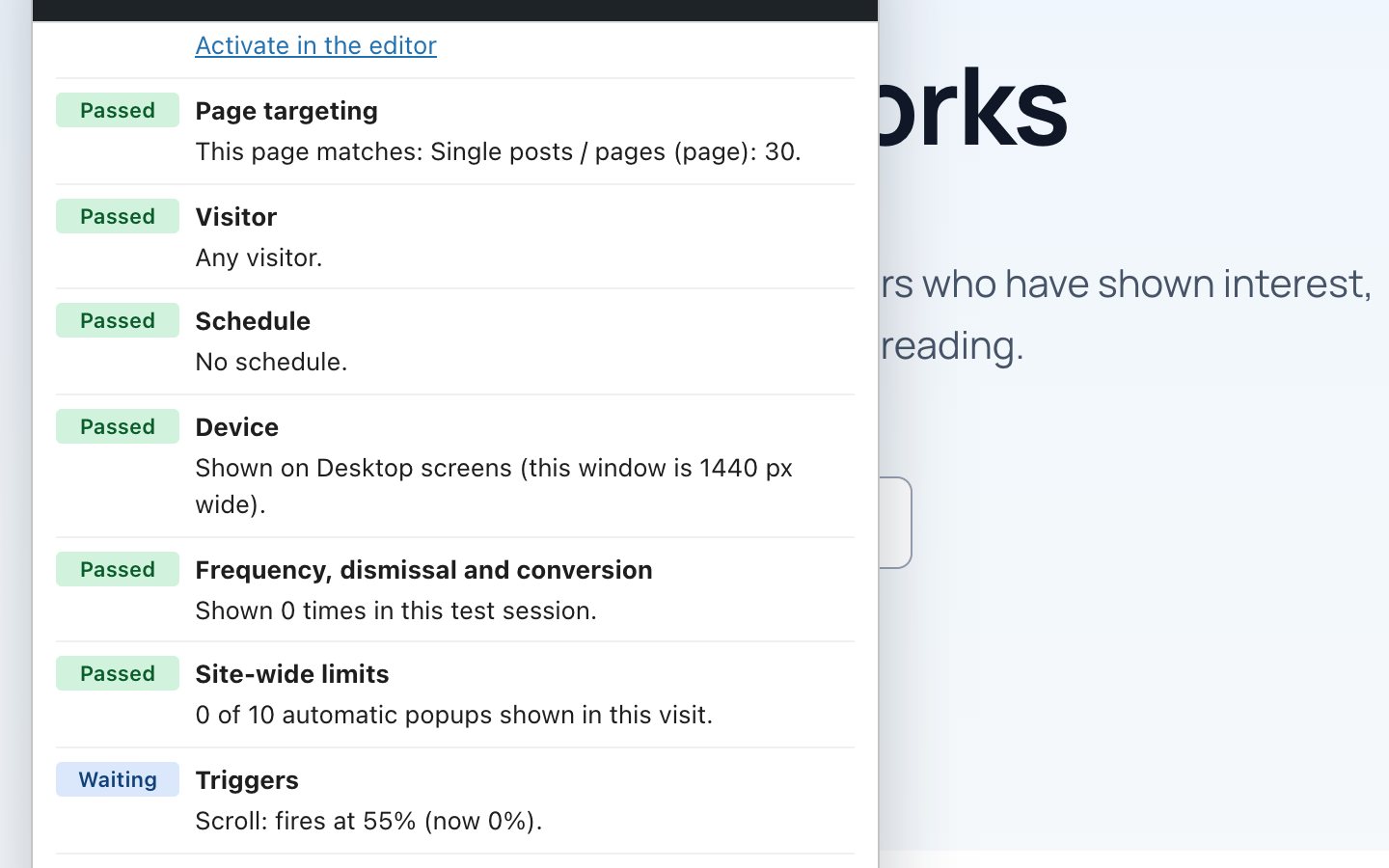
With a native popup you check each rule by hand. Divi Smart Popup has a Check campaign panel that opens on your live page and evaluates every rule for that page and that visitor — and says what to change.
- Site switch, status, targeting, visitor, schedule, device, frequency, triggers, queue and limits in one list
- Test mode: see an inactive popup on the live site, visible only to you, nothing counted
- Frequency and triggers run in the browser, so they still work on cached pages
Divi Smart Popup
Start with Check campaign
Open the popup, select Check campaign, choose a page and select Start test and open page. The panel lists every rule and what to change. It’s test mode: shown to you alone (even while inactive), kept apart from your real browsing history, not counted, and it ends from the panel or after four hours. A copyable diagnostic report goes into your support request.
If you’d rather check by hand
Not showing at all
Popup Active? Popups → Settings → Show active popups to visitors on? A site-wide limit already reached this visit?
Not on this pagetargeting
Show on must cover the page, with no Never show on rule removing it. A logged-out-only popup won’t show while you’re logged in.
Not on phonesmobile
The Devices rule must include phones. Exit intent on phones fires on a quick upward scroll after 30% of the page — not on Back or app switching. In our test it fired after scrolling 60% and flicking up. See Exit-intent popups on phones.
Scroll trigger fires at onceexpected
On a page too short to scroll, a percentage counts as fully scrolled. A scroll selector that matches nothing never fires.
Broke after an optimisation pluginscripts
Exclude divi5-popup-engine/assets/js/popup.js from combine/defer/delay. We haven’t tested specific optimisation plugins. See Caching and popups.
More than 100 active popups
Each page considers the 100 most recently created active popups; a warning appears on the Popups screens.
Popups are never printed in the admin, in feeds and embeds, while the Divi Builder is open, or on a popup’s own URL.
If you are still choosing how to build popups, native Divi 5 popups vs Divi Smart Popup lists which features each approach has, so you know which checks apply to you.
Frequently asked questions
Why does my Divi popup show for me but not for visitors?
Usually a cache: you are logged in and see a fresh page, visitors get a stored copy built before the popup was published. Clear every cache layer. Since 2.1.4, Divi Smart Popup asks common page caches (TurboCache, WP Rocket, LiteSpeed Cache, W3 Total Cache, WP Super Cache and others) to clear when a live popup changes or a scheduled campaign starts or ends, so this is mostly needed for server, host or CDN caches it cannot reach.
Why does my Divi popup show for visitors but not for me?
Your browser remembers that you saw or closed it — a frequency rule, or a native cookie condition. Test in a private window.
Why did my Divi popup stop working on mobile only?
Check device rules first (Disable On for native popups, Devices for Divi Smart Popup), then whether the popup is taller than the phone screen, then the console for errors from a script that only loads on mobile.
Did this answer the question? No — open a support request