Open a popup from a menu or link
Open a Divi popup on click from a button, image, text link or menu item: Divi 5 Interactions without a plugin, or a #link or CSS class with Divi Smart Popup.
Short answer
Divi 5 can open a popup from any Divi module on its own. Single text links and menu items are where it runs out.
- Button or image: a Click → Show Element interaction, no plugin
- A link inside a paragraph: only the whole Text module can be the trigger
- A WordPress menu item: can’t carry an interaction
- With Divi Smart Popup, any link to
#d5pe-open-123or the classd5pe-open-123opens it — menus included
Tested on 4 November 2026 with Divi 5.2.0, WordPress 7.1.4 and Divi Smart Popup, in Chromium at desktop width (1280 px) and with a phone-sized touch screen (390 px). Elegant Themes’ current release at the time was Divi 5.18.2, which we have not tested: menu labels may have moved since 5.2. The Divi Smart Popup settings used here were checked against the 2.1.4 source code on 5 November 2026; releases since our test changed licensing, page-cache clearing and accessibility, not these steps.
What can open a popup
Button
Native Click interaction, or a #d5pe-open-ID link.
Divi 5: yesSmart Popup: yes
Image
Native Click interaction on the Image module, or link the image to #d5pe-open-ID. Both tested.
Divi 5: yesSmart Popup: yes
Text link
Natively the whole Text module becomes clickable. A #d5pe-open-ID link opens it from just those words.
Divi 5: whole moduleSmart Popup: yes
Menu item
Not a Divi module, so no interaction. A Custom Link or CSS class works with Smart Popup, desktop and mobile menu.
Divi 5: noSmart Popup: yes
Without a plugin: Divi 5 Interactions
First build a hidden, fixed-position popup section — Create a Divi 5 popup without a plugin covers it. Then:

- Button: no link URL needed — Divi stops the click from following one.
- Image: put the interaction on the Image module; in our test it opened the popup exactly like a button. If the image also has a link, the interaction takes the click.
- Text link: give that sentence its own small Text module, or use the #link method below.
- Menu item: place a Divi Button in the header next to the menu instead. Elegant Themes says Divi 5’s newer Link modules support interactions (we didn’t test that).
With Divi Smart Popup: one link works everywhere
Every popup has an ID, shown on its Design step together with the exact link values to copy:
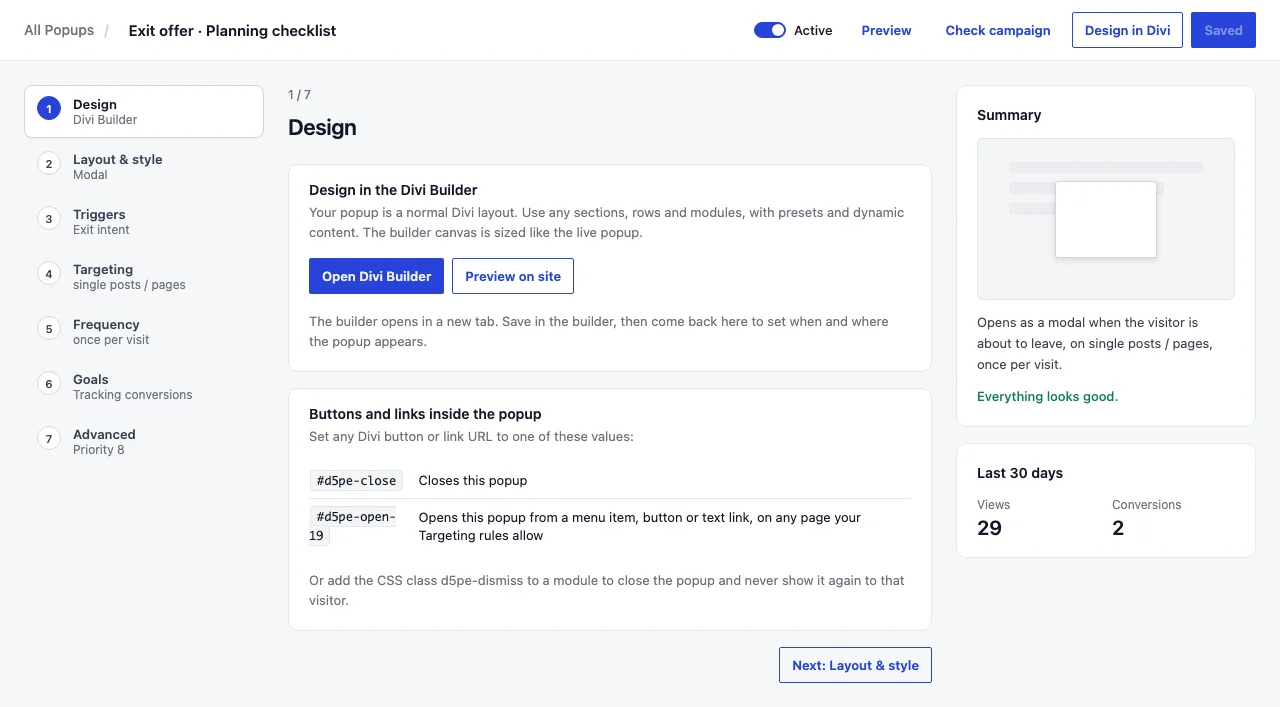
Replace 123 with your popup ID. The popup must be active and targeted at that page.
For a menu: Appearance → Menus, add a Custom Link with the URL #d5pe-open-123 — or tick CSS Classes in Screen Options and give an item the class d5pe-open-123. Divi’s Menu module uses the same menu, so it works in the mobile menu too.

From your own code
document.querySelector( '.my-button' ).addEventListener( 'click', function () {
	window.D5PE.open( 123 );
} );
See Hooks and filters for the rest of the JavaScript API.
Side by side
No pluginDivi 5 InteractionsBuilt into the theme
- Buttons, images, any Divi module
- Text links: whole module only
- WordPress menu items
- Escape or backdrop closes it
- Keyboard focus moved into the popup
PluginDivi Smart Popup#link or CSS class
- Buttons, images, text links
- Menu items, desktop and mobile
- Escape, backdrop and × close it
- Focus moves in, then back to the button
- Opens every time it’s clicked; frequency rules only limit automatic popups
Where Divi Smart Popup fits
One link for every place a visitor might click
If your popup opens from a single Divi button, the native method is fine. When the same popup has to open from the header menu, a text link and a product image — and behave like a proper dialog — that is what Divi Smart Popup handles.
#d5pe-open-IDworks in menus, buttons, images and text- Dialog behaviour tested on desktop and phone: focus, Escape, backdrop
- You still design the popup in the Divi 5 Visual Builder

If a #d5pe-open link does nothing: check the popup is Active and its Show on rules include that page (for a header link, usually Entire site). If it should only open from links, remove its automatic triggers.
Deciding between Divi’s own Interactions and a plugin for this? See native Divi 5 popups vs Divi Smart Popup.
Frequently asked questions
Can a Divi 5 menu item open a popup without a plugin?
Not a standard WordPress menu item: Divi 5 Interactions are set on Divi modules. Place a Divi Button in the header instead, build the header from Divi 5 Link modules, or use a #link or CSS class that a popup plugin listens for.
Why does my #popup link jump to the top of the page instead?
Nothing on the page claimed the click, so the browser followed the anchor. With Divi Smart Popup, that means the popup wasn’t printed on that page: it’s inactive, or its targeting doesn’t include the page.
Will a popup opened from a button still respect “show once”?
Not with Divi Smart Popup, deliberately: frequency rules apply to automatic triggers, and a visitor who clicks has asked to see it. With the native cookie method, the condition hides the whole section, so the button stops working too once the cookie is set.
Does it work on the mobile menu?
With Divi Smart Popup, yes: the class or link sits on the menu item itself, so it works in the desktop and mobile versions of the Divi Menu module.
Did this answer the question? No — open a support request