Native Divi 5 popups vs Divi Smart Popup
Divi 5 builds popups with Canvases and Interactions. What that covers, where it stops, and what Divi Smart Popup adds: targeting, frequency, tests and stats.
Short answer
Divi 5 can build popups on its own. Use its Canvases and Interactions when a visitor opens the popup with a click. Use Divi Smart Popup when popups should open by themselves and you want to run them as campaigns.
- Native Divi 5: design, click to open, a delay, a section scrolled into view, hide for a year with a cookie
- Native Divi 5: no built-in overlay, Escape key, exit intent, visit-based frequency or numbers
- Divi Smart Popup: one list of popups, targeting, schedules, frequency rules, templates, test mode, stats and import/export
- Divi Smart Popup is not a new builder: you still design in the Divi 5 Visual Builder
Both approaches use the same Divi 5 Visual Builder, so the design of the popup can look the same either way. The difference is everything around it: when it opens, who sees it, how often, and whether you can tell if it works. This page compares the two point by point, so you can pick the lighter option if it is enough.
What we checked. The native behaviour was tested on 4 November 2026 with Divi 5.2.0 and WordPress 7.1.4, as described in How to create a Divi 5 popup without a plugin. Elegant Themes ships Divi updates often, so later versions may add options. Every Divi Smart Popup feature below was checked against the source code of version 2.1.4. The admin screenshots were taken on an earlier release that still showed the old name “Divi Popup” in places; later releases changed licensing, page-cache clearing and accessibility, not the settings shown.
What Divi 5 does without a plugin
In Divi 5 a popup is a normal section that you hide, then show with an Interaction. You can build it on one page or, to reuse it across the site, in a global canvas or a Theme Builder template. Our test covered the single-page version:
- Open with Click → Show Element on any module: a button, an image or text.
- Open automatically with a Load interaction and a time delay, or Viewport Enter on a module further down the page.
- Close with Click → Hide Element on your own close button.
- Hide it after a close with an Add Cookie interaction and a “Cookie does not exist” condition on the section. In Divi 5.2 the cookie lasts a year.
For a size guide, a booking form or a “read more” panel that only opens when someone asks for it, this is often all you need. The full build, with screenshots, is in How to create a Divi 5 popup without a plugin.
Side by side
| Native Divi 5 | Divi Smart Popup | |
|---|---|---|
| Design | Divi 5 Visual Builder | Divi 5 Visual Builder, sized like the live popup |
| Open on click | Yes, from modules | Yes, from any link, button, image or menu item |
| Open after a delay | Yes (Load + time delay) | Yes |
| Open on scroll | Partly: when a module enters the screen | Yes: a scroll percentage or an element in view |
| Exit intent | No | Yes, on desktop and on phones |
| Inactivity, page views, URL parameter | No | Yes |
| Overlay, Escape key, click outside | Not built in | Yes |
| How often a visitor sees it | A one-year cookie, set by a click | Every time, once per visit, every few days or only once |
| Stop after a sign-up | No | Yes |
| Who sees it | Divi’s element conditions (we tested only the cookie one) | Pages, post types, archives, categories, authors, logged-in state, role, device |
| Start and end dates | Not tested | Yes |
| Several popups on one page | Each interaction runs on its own | Priority, plus site-wide limits per visit |
| Test before it goes live | Preview the page | Test mode and Check campaign, visible only to you |
| Views and conversions | No | Yes, by device, with CSV export |
| Move to another site | With the page or layout (not tested by us) | JSON export and import of popups and their settings |
| Templates | Your own layouts | 37 popup templates |
| Price | Included with Divi | Paid licence |
What Divi Smart Popup adds
All popups in one place
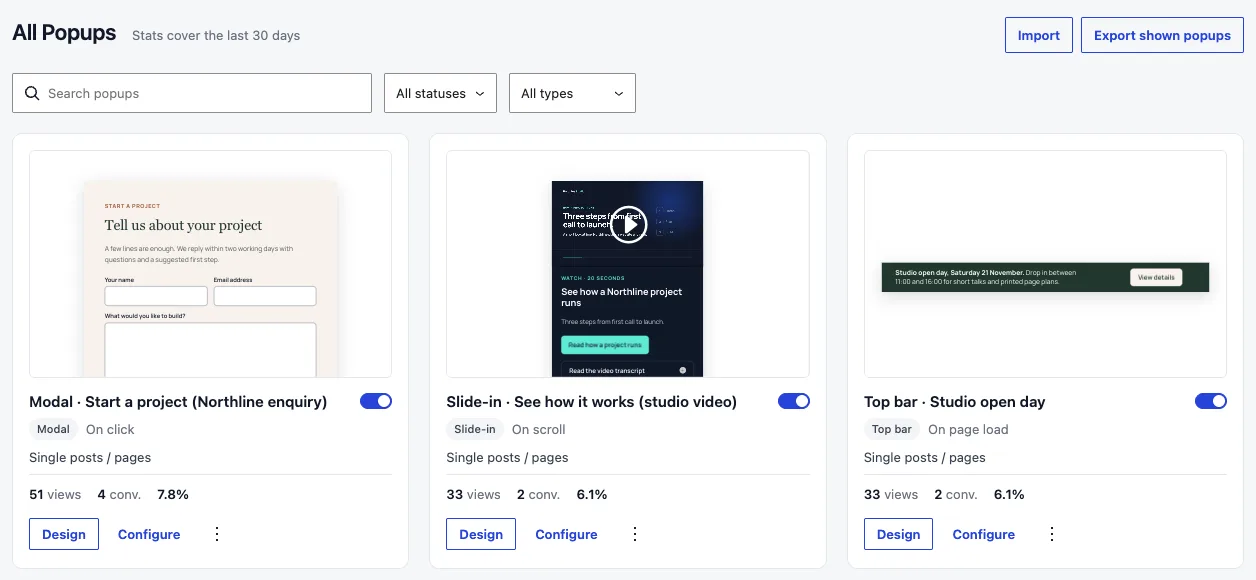
Every popup is listed on Popups › All Popups with its type, its trigger, where it shows, an on/off switch and its views and conversions for the last 30 days. You can search, filter by status or type, and open the design or the settings from the card. Popups › Settings has one switch that turns every popup off at once, for example during a redesign.
Templates to start from
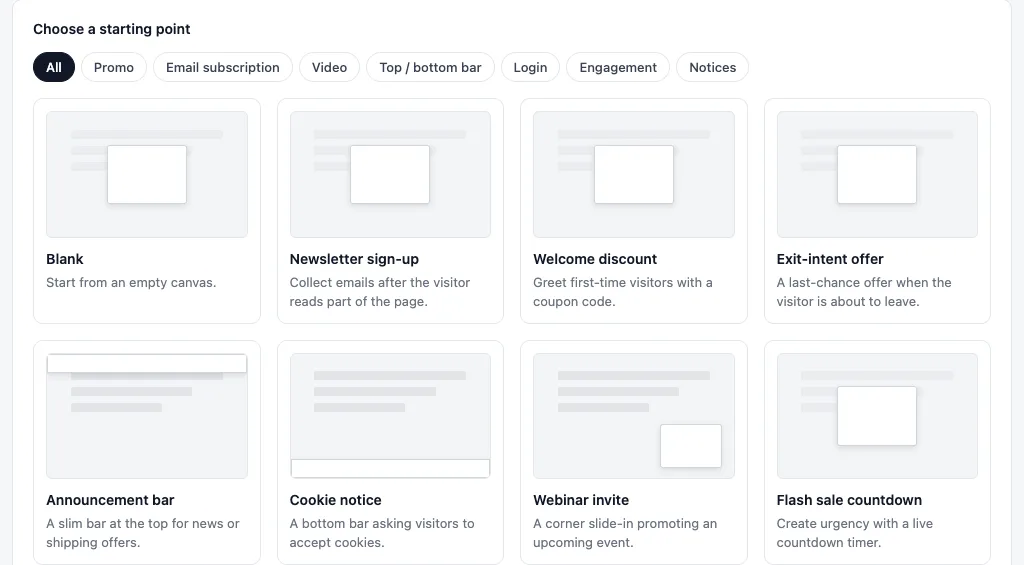
Popups › Add New offers 37 templates in groups such as Promo, Email subscription, Video, Top/bottom bar, Login, Engagement and Notices, or a blank canvas. A template is an ordinary Divi layout, so you change it in the Visual Builder like any other.
Triggers, targeting and schedules
Each popup can have several triggers: page load with a delay, scroll depth or an element in view, exit intent, a click on any element, inactivity, a number of page views and a URL parameter. The trigger reference explains when each one fires and when it does not.
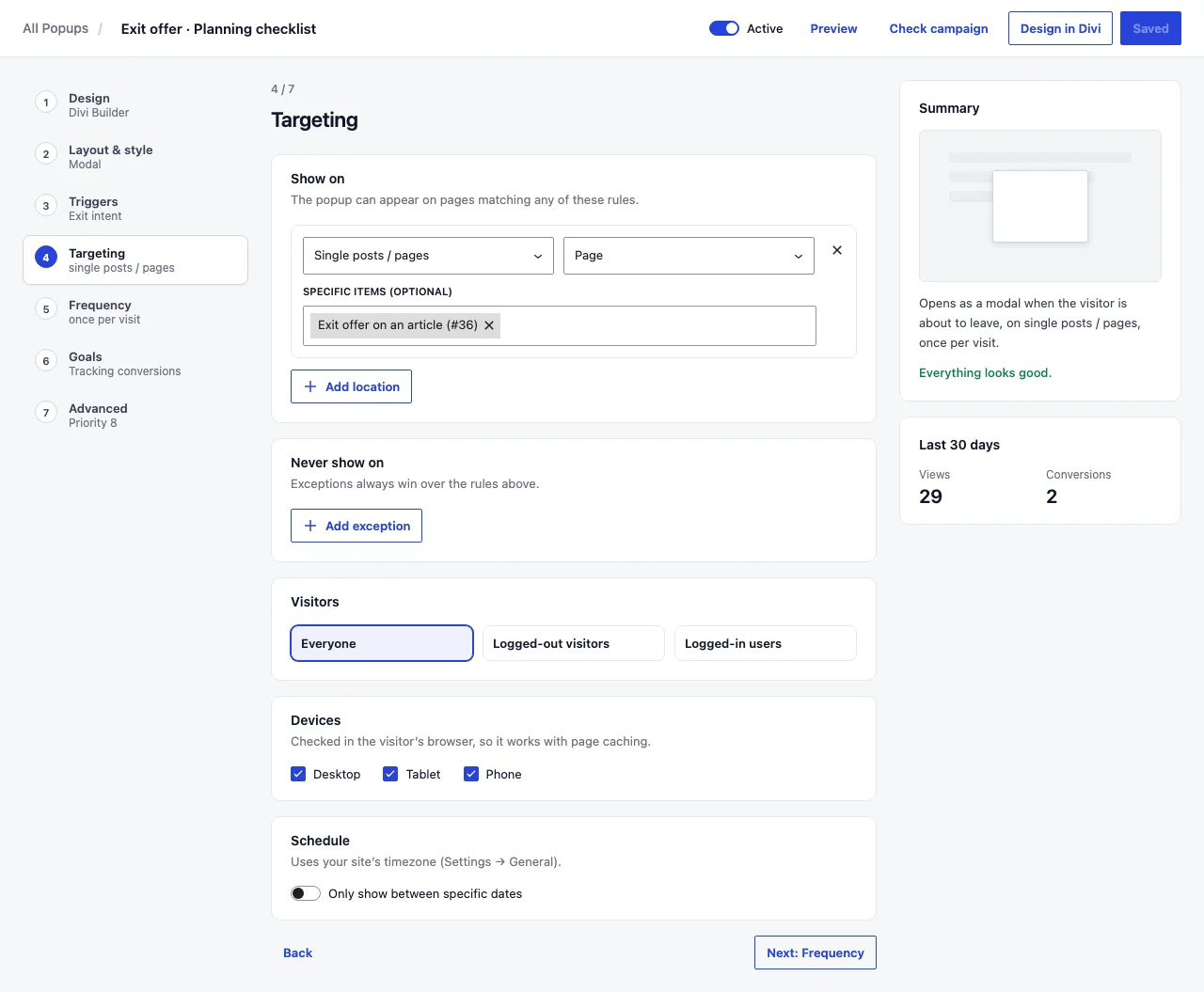
The Targeting step decides where and for whom: the whole site, the front page, chosen pages, post types, archives, categories or tags, authors, search results and 404 pages, with exclusions; logged-in or logged-out visitors; user roles; desktop, tablet and phone; and a start and end date. See targeting rules and schedules, priority and limits.
Frequency rules that match how people browse
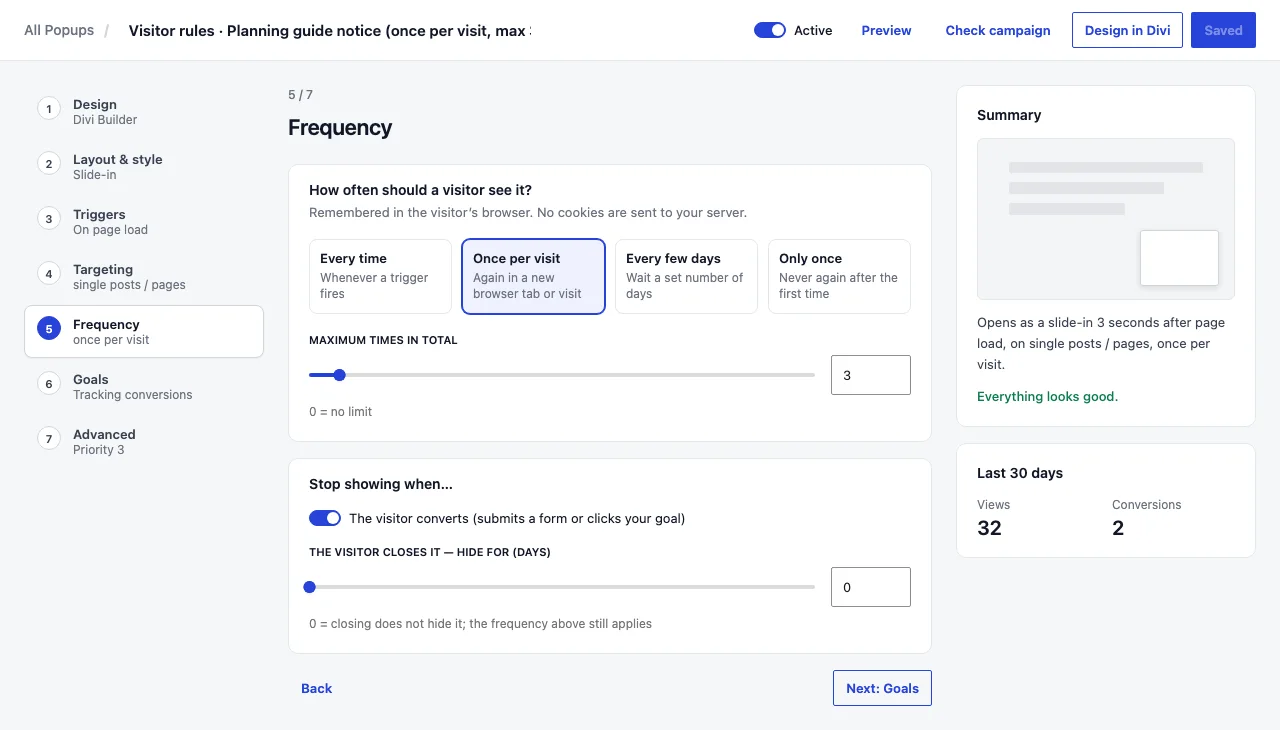
Choose every time, once per visit (a visit lasts as long as the browser tab), every few days or only once. On top of that you can cap the total number of times, stop after the visitor converts, and hide the popup for a number of days after they close it. The rules live in the visitor’s browser storage, so they work with page caching but do not follow a person to another browser or device. Details in frequency caps and show a Divi popup only once per visitor.
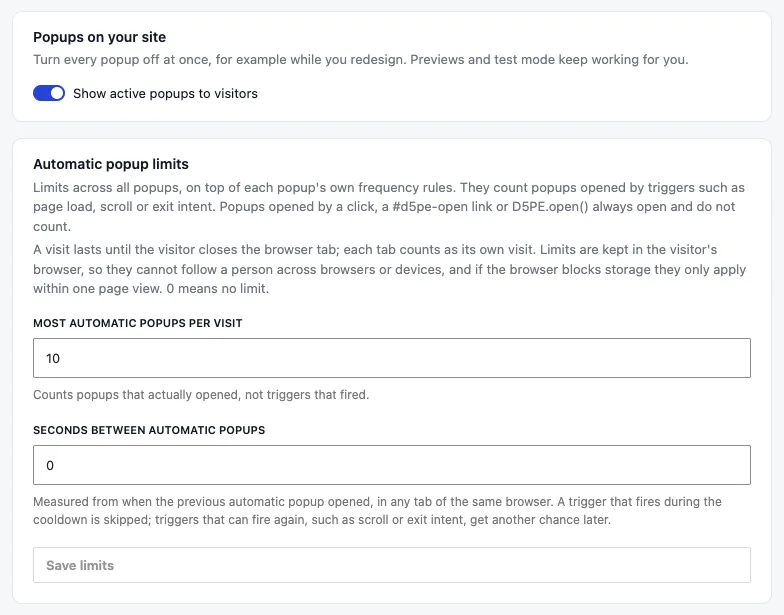
When several popups could open on one page, the one with the higher priority wins. Site-wide limits, which are off by default, cap how many automatic popups a visitor sees per visit and how many seconds must pass between them. Popups opened by a click or a link always open.
Safe testing on the live site
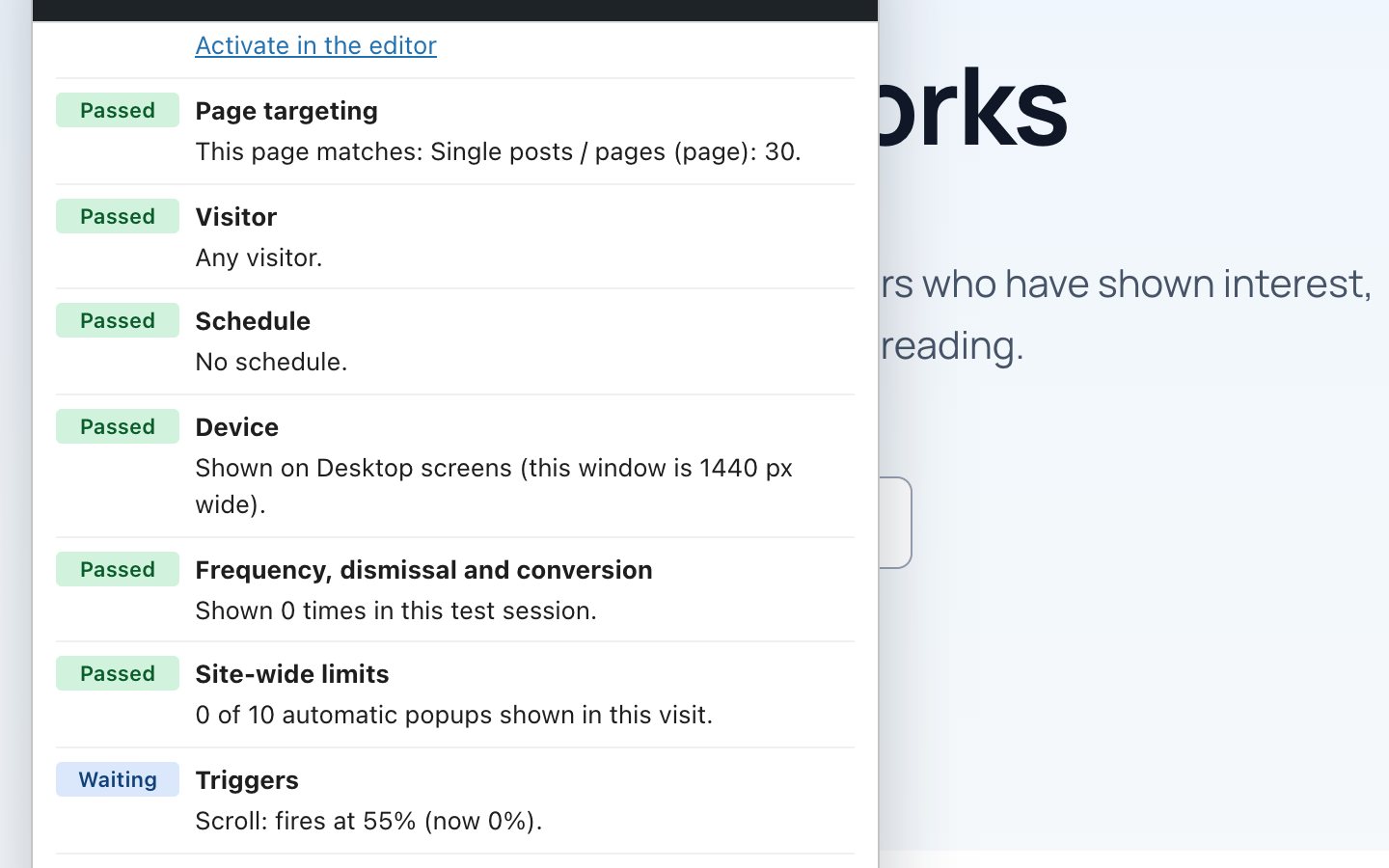
Check campaign starts test mode for one popup and opens a page of your site. The popup shows for you only, even while it is inactive, and a panel lists every rule for that page: site switch, status, targeting, visitor, schedule, device, frequency, triggers and limits, with what to change. Test history is kept apart from your normal browsing, nothing is counted in the statistics, and test mode ends after four hours or when you end it. This is the quickest fix when a popup is not appearing.
Views, closes and conversions
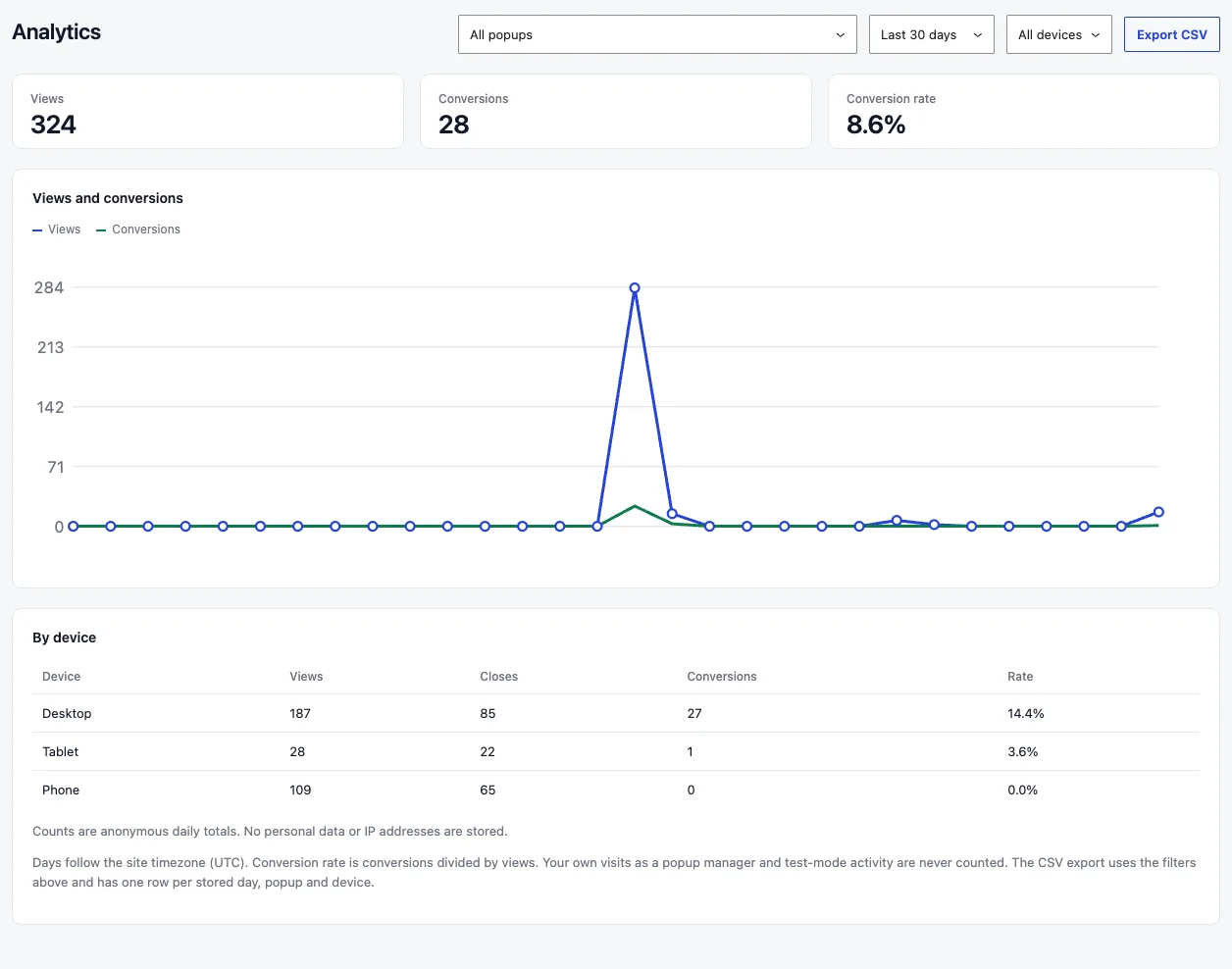
Popups › Analytics shows views, closes and conversions per popup, date range and device, and exports them as CSV. A Divi Contact Form or Email Optin counts as a conversion when it succeeds; other forms count when they are submitted, and you can also count clicks on elements you choose. Statistics are anonymous daily totals: no IP addresses or personal data, and your own visits as a popup manager are not counted. More in analytics and CSV export.
Export and import between sites
A popup, or every popup in the current list, can be exported as a JSON file with its Divi design, the presets and global colours it uses, and all its settings. On import you review how pages, categories and authors are matched on the new site before anything is created, and imported popups always start inactive. See export and import popups.
What Divi Smart Popup does not do
- It needs the Divi 5 theme or a Divi 5 child theme. Divi 4, Extra and the standalone Divi Builder plugin are not supported.
- It has no email-marketing or CRM connection of its own. Use Divi’s Email Optin module, or your form plugin, inside the popup. See Divi email signup popup.
- Statistics are counts, not experiments: there is no A/B testing.
- Frequency is remembered per browser. A visitor who switches device, or clears site data, can see a popup again.
- Every popup feature works without a licence; an active licence adds AI design and automatic updates. Popups you have already published keep showing if it lapses.
- We have tested it in Chrome on desktop and phone-sized screens. Other browsers and third-party plugins have not been tested by us yet.
Which one to use
- Native Divi 5 if the popup only opens when someone clicks, you have one or two of them, and you do not need to know how often they are used.
- Divi Smart Popup if the popup should open by itself (delay, scroll, exit intent), must not annoy returning visitors, should only appear on some pages or devices, or if you want to see views and conversions.
- Still unsure? Build the native version first with our step-by-step guide. If you keep adding cookies and workarounds, that is the point where a plugin saves time.
Where Divi Smart Popup fits
Run popups as campaigns, still designed in Divi 5
Divi Smart Popup keeps the Divi 5 Visual Builder for design and adds the rules around it: triggers, targeting, schedules, frequency, test mode and anonymous stats.
- Seven popup types and 37 templates
- Exit intent on desktop and phones, scroll, delay, inactivity, page views and URL parameters
- Check campaign and test mode before a popup goes live
- Views, closes and conversions by device, with CSV export
See Divi Smart PopupRead the documentation
Requires the Divi 5 theme. Start with Publish your first popup.

Frequently asked questions
Does Divi 5 have a built-in popup builder?
Not as a separate feature, but you can build popups with it: a hidden section or canvas, opened and closed with Interactions. It covers click-to-open popups well and has no built-in exit intent, overlay or visit-based frequency.
Is Divi Smart Popup a different page builder?
No. Each popup is designed in the Divi 5 Visual Builder with normal Divi modules, presets and global colours. The plugin adds the settings for triggers, targeting, frequency and goals.
Does Divi Smart Popup work with Divi 4?
No. It requires the Divi 5 theme or a Divi 5 child theme.
Will popups slow down my pages?
Only popups whose rules match the page are printed, and their images and embedded videos load when the popup opens. Each matching active popup still adds a little to the page, so switch off popups you no longer use.
Did this answer the question? No — open a support request