Divi popup triggers: delay, scroll and exit intent
How to open a Divi popup after a delay, on scroll or on exit intent: what Divi 5 does natively, what it cannot do, and how Divi Smart Popup handles phones.
Short answer
Divi 5 can do a delay and a rough scroll trigger on its own. It can’t do exit intent.
- Delay: a Load interaction with a Time Delay
- Scroll: Viewport Enter on a module placed down the page — no percentage
- Exit intent: no native trigger, on desktop or phone
- Divi Smart Popup adds all three, plus inactivity, page views and URL parameters, with frequency rules
Tested on 4 November 2026 with Divi 5.2.0, WordPress 7.1.4 and Divi Smart Popup, in Chromium at desktop width (1280 px) and with a phone-sized touch screen (390 px). Elegant Themes’ current release at the time was Divi 5.18.2, which we have not tested: menu labels may have moved since 5.2. The Divi Smart Popup settings used here were checked against the 2.1.4 source code on 5 November 2026; releases since our test changed licensing, page-cache clearing and accessibility, not these steps.
For the native steps you need a hidden popup section first — see Create a Divi 5 popup without a plugin.
The three triggers at a glance
After a delay
Native: Load + Time Delay (ms). Smart Popup: On page load, 0–600 s.
Divi 5: yesSmart Popup: yes
On scroll
Native: Viewport Enter on a module at that point. Smart Popup: a scroll % or an element coming into view.
Divi 5: workaroundSmart Popup: yes
Exit intent
Native: not available. Smart Popup: pointer leaving the top on desktop, quick upward scroll on phones.
Divi 5: noSmart Popup: yes
How often
Native: one cookie, fixed at a year. Smart Popup: every time, once per visit, every few days, only once.
Divi 5: partialSmart Popup: yes
After a delay
Without a plugin
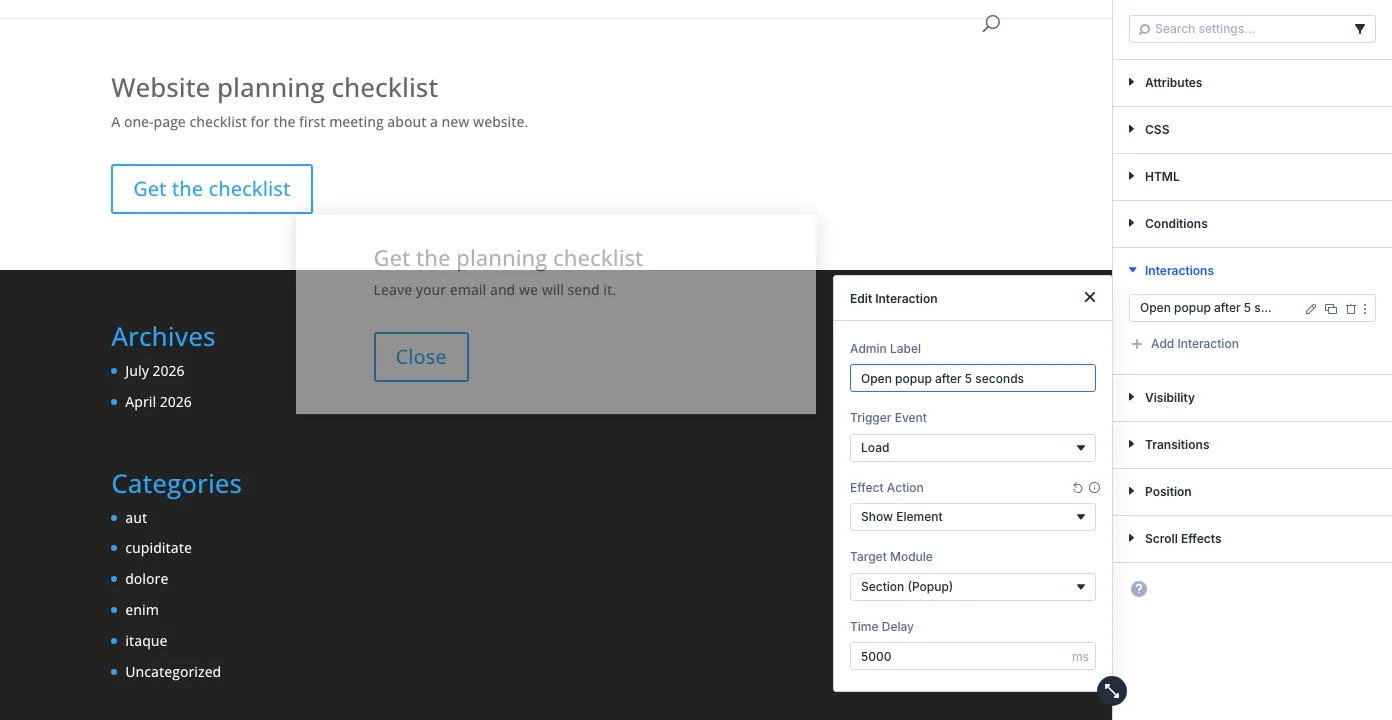
In our test it opened about 5.9 seconds after navigation began, because the delay starts once the page has loaded. On its own it opens on every page view — add the cookie condition from the no-plugin guide if it should stop after a close.
With Divi Smart Popup

Combine it with Once per visit: in our test a top bar with a 2-second delay opened at about 2.3 s, didn’t reopen on reload in the same tab, and opened again in a fresh browser.
On scroll
Without a plugin
Put a Viewport Enter interaction (Show Element → the popup) on a module where the popup should appear — e.g. the paragraph after the third section of an article. In our test it stayed hidden at the top of a long page and opened when that paragraph scrolled into view. The point moves when the article gets longer or shorter.
With Divi Smart Popup
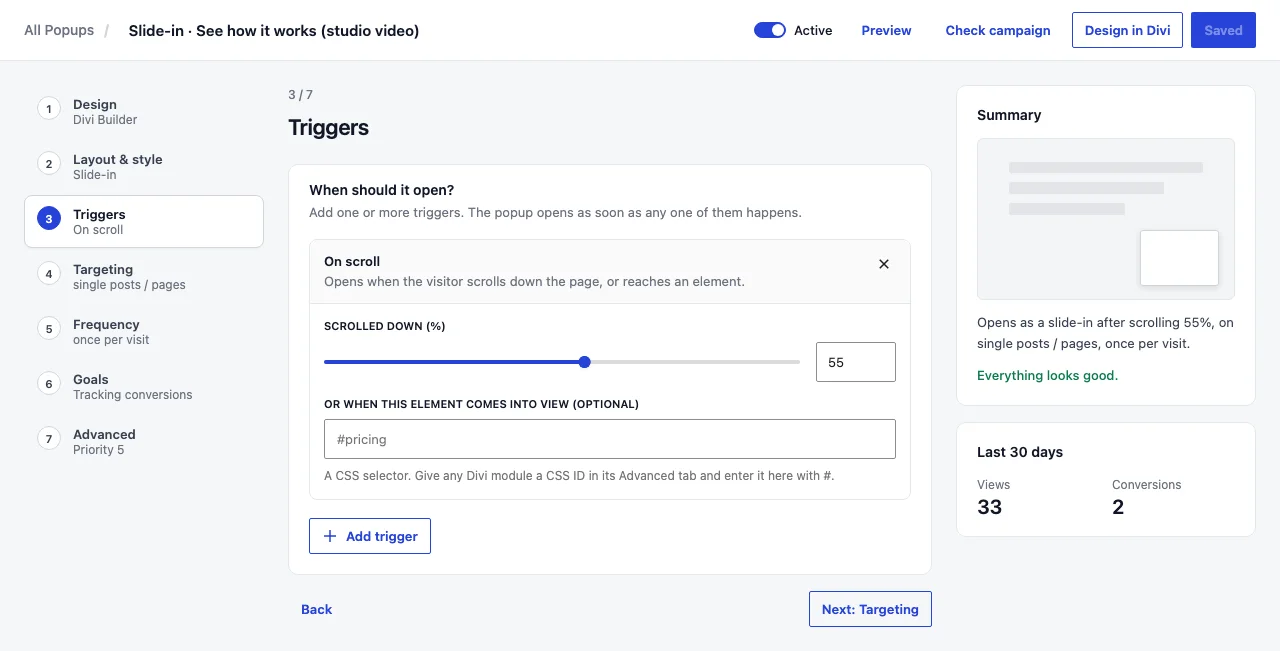
With 55%, a slide-in stayed closed at 40% and opened at 60%, on desktop and phone. On a page too short to scroll, a percentage counts as fully scrolled and fires straight away — use a delay there.
Exit intent
Exit intent is a guess that a visitor is about to leave. On a computer the signal is the pointer moving up and out of the window. Phones have no pointer, which is why most exit-intent popups never show on mobile.
No pluginDivi 5 on its ownInteractions
- No exit-intent trigger
- Mouse Exit watches one module, not the browser window
- Nothing for phones
PluginDivi Smart PopupExit intent trigger
- Desktop: pointer leaves through the top of the window
- Phones and tablets: a quick upward scroll after 30% of the page
- Phone behaviour can be switched off per popup
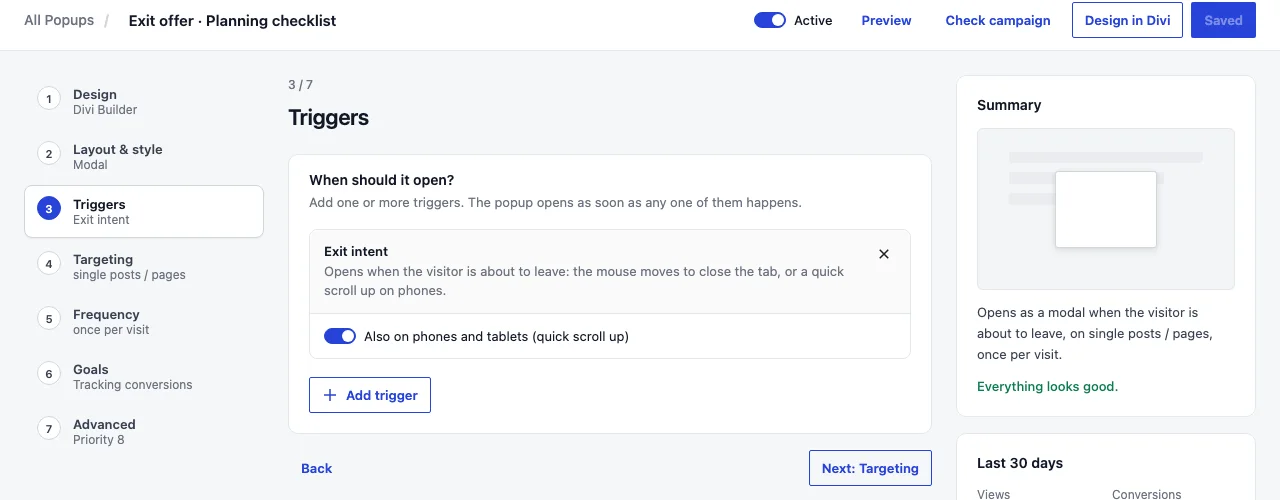
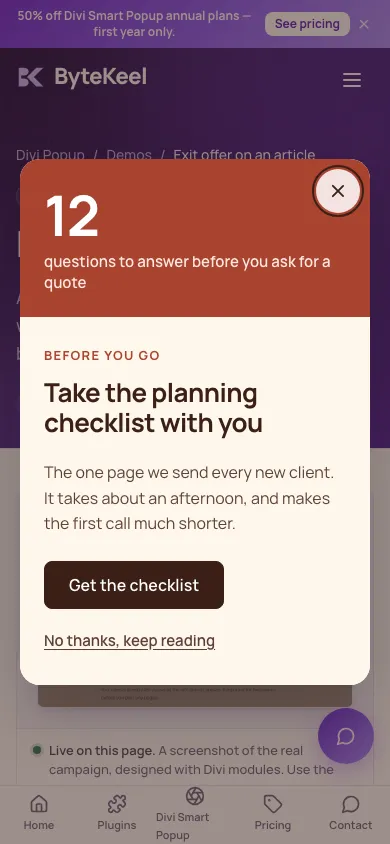
Both were confirmed in our test: on desktop when the pointer left the top edge, and on a phone after scrolling 60% and flicking back up.
Where Divi Smart Popup fits
Want exit intent that also works on phones?
Delay and click popups are fine natively. If your best offer is the one you show to people about to leave — or you need the popup to stop after it has been seen — Divi Smart Popup does it without code, and you still design the popup in Divi 5.
- Exit intent on desktop and touch devices
- Scroll %, element in view, delay, inactivity, page views, URL parameter
- Once per visit, every few days, only once, stop after a conversion
See Divi Smart PopupTry the live demos
Try it on the exit offer demo. All options: Trigger reference.
Choosing a trigger that doesn’t annoy people
Match the offer
Delay for a site-wide notice; scroll for something about the article; exit intent for a last, genuinely useful offer.
Always limit repeats
An automatic popup with no frequency rule appears on every page view.
Be careful on phones
A popup covering content as soon as someone arrives from search is the pattern Google describes in Avoid intrusive interstitials. Prefer a bar, a slide-in, or a trigger that waits.
Test as a new visitor
A private window, or Divi Smart Popup’s Check campaign, which shows which trigger a popup is waiting for.
Triggers are one part of the decision. Native Divi 5 popups vs Divi Smart Popup also compares frequency, targeting, testing and statistics.
Choosing a popup plugin rather than a trigger? Best Divi 5 popup plugin? Compared by use case compares the Divi 5 options and the triggers each one offers.
Frequently asked questions
How do I make a Divi popup appear after 5 seconds?
Natively: a Load interaction on a module that is always on the page, with Show Element targeting the popup and a Time Delay of 5000 ms. With Divi Smart Popup: an On page load trigger with a 5-second delay.
Can a Divi 5 popup open at 50% scroll without a plugin?
Not as a percentage. Use a Viewport Enter interaction on a module placed roughly halfway down the page.
Does exit intent work on mobile?
Classic exit intent needs a mouse, so it doesn’t. Divi Smart Popup uses a touch equivalent — a quick upward scroll after reading part of the page — and native Divi 5 has no exit-intent trigger at all.
Can I combine triggers?
In Divi Smart Popup a popup can have several triggers; the first one to fire opens it, and its frequency rules decide whether a later trigger may open it again. Natively you can add several interactions that show the same section, but each fires independently.
Did this answer the question? No — open a support request