How to create a Divi 5 popup without a plugin
Build a popup with Divi 5's own Interactions: a hidden fixed section, a button that shows it, a close button, an optional delay and a cookie.
Short answer
Yes. Divi 5 can open and close a popup without any plugin, using Interactions on a hidden section.
- Open it from a button or image click
- Open it after a delay, or when part of the page scrolls into view
- Hide it after it is closed, with a cookie that lasts a year
- No exit intent, no “once per visit”, no stats, no Escape or click-outside closing
This guide builds the native version step by step, then shows exactly where it stops — so you can decide whether you need anything more.
When you need more than click-to-open (automatic triggers, page targeting and frequency), Build a Divi 5 popup campaign without code walks through it with Divi Smart Popup.
Tested on 4 November 2026 with Divi 5.2.0, WordPress 7.1.4, in Chromium at desktop width (1280 px) and with a phone-sized touch screen (390 px). Elegant Themes’ current release at the time was Divi 5.18.2, which we have not tested: menu labels may have moved since 5.2.
You need the Divi 5 theme (or a Divi 5 child theme). Nothing else.
How a native Divi popup works
Everything happens in the Visual Builder: no code, no plugin.

Step 1: Build the popup as its own section
- Add a section and build the popup content in it — heading, text, a form or a button.
- Give the section an admin label such as Popup. The interaction editor lists modules by this label.
- Advanced → Position: Position Fixed, the centre point in Offset Origin, and a high Z Index (we used 99999).
- Design: a background colour, padding and a width under Sizing (we used 90% with a 520px maximum).
Step 2: Hide it by default
Advanced → Visibility → Disable On: switch on Desktop, Tablet and Phone — the method Elegant Themes uses in its Divi 5 popup tutorial. The section stays in the page, so an interaction can still show it, and the builder shows it faded so you can keep editing.

Step 3: Open it from a button
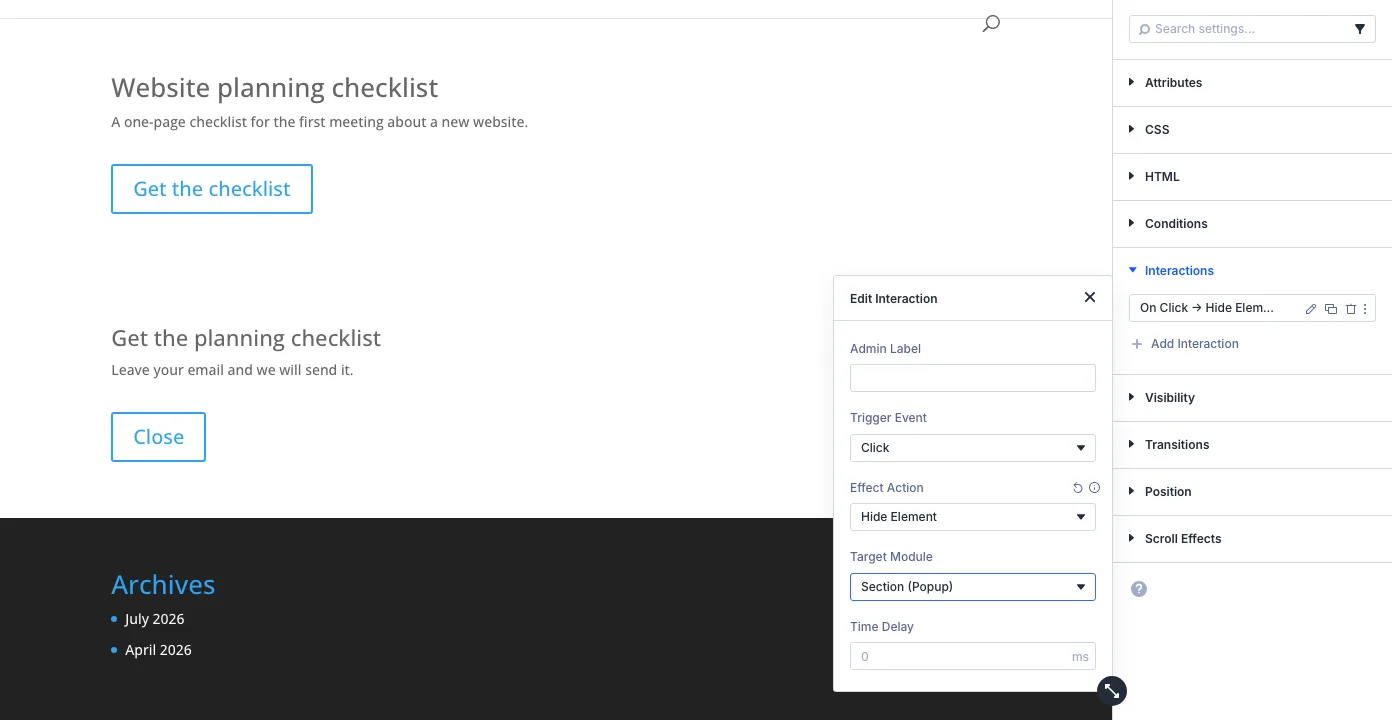
On the button: Advanced → Interactions → Add Interaction, trigger Click, Effect Action Show Element, Target Module Section (Popup).

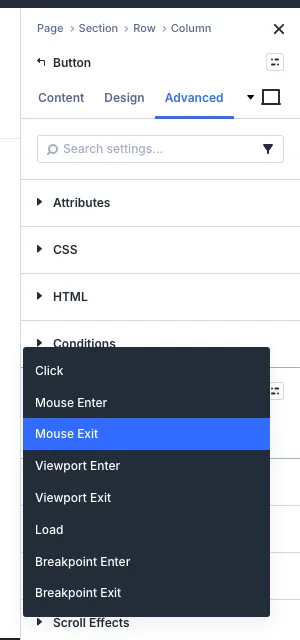
These are all the triggers Divi 5.2 offers. Any module can carry them, so an Image or Text module works the same way as a button.
Step 4: Add a close button
On a Close button inside the popup add Click → Hide Element → Section (Popup). Save, then test in a private window.
Optional: open it automatically
After a delay
A Load interaction on any module that is always on the page, with a Time Delay such as 5000 ms. Opened at about 5.9 s in our test.
Works natively
Part way down
A Viewport Enter interaction on a module halfway down the page. There is no “50% scrolled” setting.
Workaround only
When leaving
Divi 5 has no exit-intent trigger. Mouse Exit watches one module, not the browser window.
Not available
More detail, with examples, in Divi popup triggers: delay, scroll and exit intent.
Optional: don’t show it again after a close
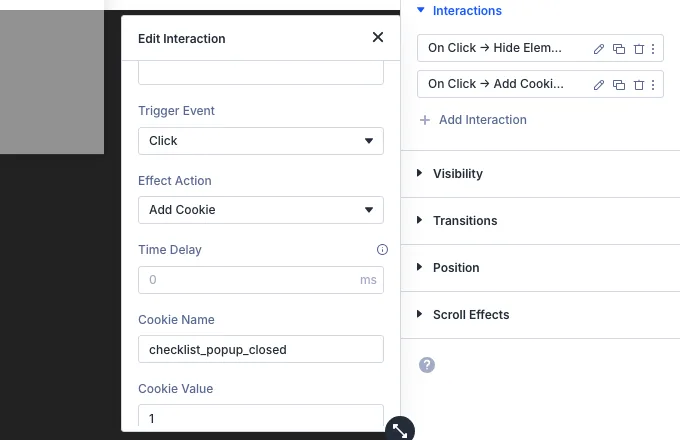
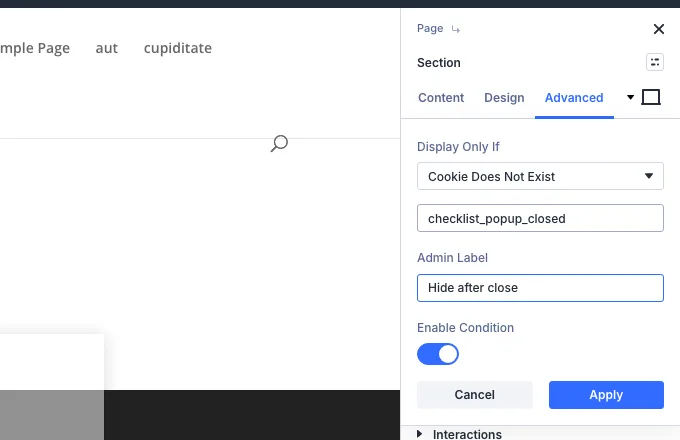
- One year, fixed. Divi 5.2 sets the cookie for 365 days; there is no field for a day, a week or a visit.
- Checked on the server. A full-page cache can serve the popup to people who already have the cookie.
- It hides it from you too. Test in a private window after you click Close once.
Using it on every page
Elegant Themes suggests building it in a global canvas or a Theme Builder template — see Creating interactive off-canvas elements and popups. We tested the single-page version only.
What the native method can’t do
We checked each of these on the front end. None is a bug; Interactions simply aren’t a popup system.
No backdrop
The page behind stays bright and clickable.
Divi 5: noSmart Popup: yes
No Escape, no click outside
Only your own Close button closes it. Keyboard focus stays on the page behind, and it isn’t announced as a dialog.
Divi 5: noSmart Popup: yes
No exit intent
There is no way to react to a visitor about to leave — on desktop or phone.
Divi 5: noSmart Popup: yes
One frequency rule
A one-year cookie, set by a click. No once per visit, every 7 days, or “stop after they sign up”.
Divi 5: partialSmart Popup: yes
No numbers
No views, closes or conversions to compare.
Divi 5: noSmart Popup: yes
No menu items
A normal WordPress menu item can’t carry an interaction.
Divi 5: noSmart Popup: yes
Where Divi Smart Popup fits
Need the parts the native method leaves out?
If your popup only opens on click — a size guide, a booking form — the native method is enough. Divi Smart Popup is for when the popup should run itself: you still design it in the Divi 5 Visual Builder, and it adds the rules around it.
- Exit intent on desktop and phones, scroll %, delay, inactivity, page views, URL parameters
- Once per visit, every few days, only once, stop after a sign-up
- Dimmed overlay, Escape and click-outside closing, keyboard focus handled
- Seven popup types, targeting by page, visitor and device, anonymous stats
See Divi Smart PopupTry the live demos
Tested in the same session as this guide. If all you need is an email opt-in form, Elegant Themes’ Bloom is another option; check its Divi 5 support first.

Not sure the native method is enough? Native Divi 5 popups vs Divi Smart Popup compares the two point by point. To build the same popup with the plugin instead, follow Publish your first popup.
Frequently asked questions
Can I make a popup in Divi 5 without a plugin?
Yes. Hide a fixed-position section on all devices, then use Interactions: Click → Show Element on a button to open it and Click → Hide Element on a close button to close it.
Does a native Divi popup work on mobile?
Yes. The same interactions opened and closed it on a phone-sized touch screen in our test. Keep the popup shorter than the screen: a fixed section taller than the screen can’t be scrolled into view.
Can a native Divi popup show only once?
Roughly: an Add Cookie interaction on the close button plus a Cookie Does Not Exist condition hides it for a year. Shorter periods aren’t available, and full-page caching can get in the way.
Can Divi 5 open a popup on exit intent?
Not natively. Divi 5.2’s triggers are Click, Mouse Enter, Mouse Exit, Viewport Enter, Viewport Exit, Load, Breakpoint Enter and Breakpoint Exit. Exit intent needs a plugin or your own script.
Did this answer the question? No — open a support request