Show a Divi popup only once per visitor
Show a Divi 5 popup once per visit, once every few days or only once — what “once” really means, how to do it with localStorage, and privacy.
“Show it once” sounds like one setting. In practice it is three different rules, and picking the wrong one is why popups either nag people or never show again. Divi 5 on its own can only remember a close, with a cookie that lasts a year, so anything finer is either a little code or a plugin.
Short answer
Divi 5 can hide a popup after it is closed, but only for a year at a time. Anything finer needs code or a plugin.
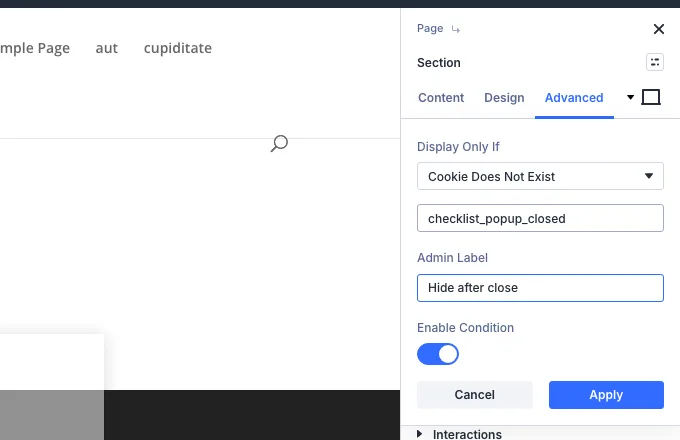
- Native: Add Cookie on the close button + a Cookie Does Not Exist condition — fixed 365 days
- Native: no once per visit, no every 7 days, no stop after a sign-up
- By hand: a short script with localStorage (below)
- Divi Smart Popup: four frequency modes, a maximum, stop after conversion, hide after close
Decide what “once” means
- Once per visit — not again while the visitor is browsing, but again next time. Kind for offers and sign-ups.
- Once every few days — a reminder that does not become wallpaper.
- Only once — for an announcement or a notice that only needs reading once.
Add two refinements: never again after the visitor has signed up (a conversion), and hide for a while after they close it.
Once per visit
Not again while browsing; again next time. Kind for offers and sign-ups.
Divi 5: noSmart Popup: yes
Every few days
A reminder that does not become wallpaper.
Divi 5: noSmart Popup: yes
Only once
For an announcement that only needs reading once.
Divi 5: 1-year cookieSmart Popup: yes
Never after sign-up
Stop once the visitor has converted.
Divi 5: noSmart Popup: yes
Where “seen” is remembered
A website can only remember this in the visitor’s browser (or in an account, if they log in). The options are a cookie, localStorage (kept until cleared) and sessionStorage (kept for the life of the tab). Cookies are sent to your server with every request, which you do not need for this; local storage is not.
All three share the same limits: a visitor in a private window, on another browser or another device, or who clears site data, is new again. No technique gets round that without tracking people across devices.
Doing it by hand in Divi 5
Build the popup as a hidden section with a CSS class (for example my-offer, hidden with display:none), then add this to Divi → Theme Options → Integration inside a script tag. It shows the popup after three seconds, at most once every seven days:
( function () {
	var key = 'my-offer-seen';
	var days = 7;
	var last = 0;
	try { last = parseInt( localStorage.getItem( key ), 10 ) || 0; } catch ( e ) {}
	if ( Date.now() - last < days * 86400000 ) {
		return;
	}
	setTimeout( function () {
		var box = document.querySelector( '.my-offer' );
		if ( ! box ) { return; }
		box.style.display = 'block';
		try { localStorage.setItem( key, String( Date.now() ) ); } catch ( e ) {}
	}, 3000 );
}() );
For once per visit, use sessionStorage instead and drop the day check. For only once, store any value and never show it again if the key exists. Wrapping storage in try matters: some browsers block storage and would otherwise stop the script.
Divi 5 also has a no-code version of this, with one fixed rule: an Add Cookie interaction on the close button and a Cookie Does Not Exist condition on the popup section hide it for a year after it is closed. See step 6 of Create a Divi 5 popup without a plugin, and Create a Divi email signup or contact form popup for sign-up forms.
Privacy
In the UK and EU, the ePrivacy rules cover “similar technologies” such as local storage, not just cookies. Whether remembering that a popup was seen needs consent depends on your situation; it is a question for your privacy policy and, where needed, your adviser. The less you store, the easier the answer: a timestamp per popup, kept in the browser, is about as little as it gets.
With Divi Smart Popup
In Divi Smart Popup this is the Frequency step: Every time, Once per visit (the default; a visit is the life of the browser tab), Every few days or Only once, plus Maximum times in total, stop after a conversion, and hide for a number of days after a close. History is kept in the visitor’s local and session storage — no cookie, nothing sent to your server. See Frequency caps.
To stop several popups adding up, Popups → Settings → Automatic popup limits caps how many automatic popups one visitor sees per visit and how long to wait between them. To check what a returning visitor sees, use Check campaign, which keeps test history separate from your real browsing.
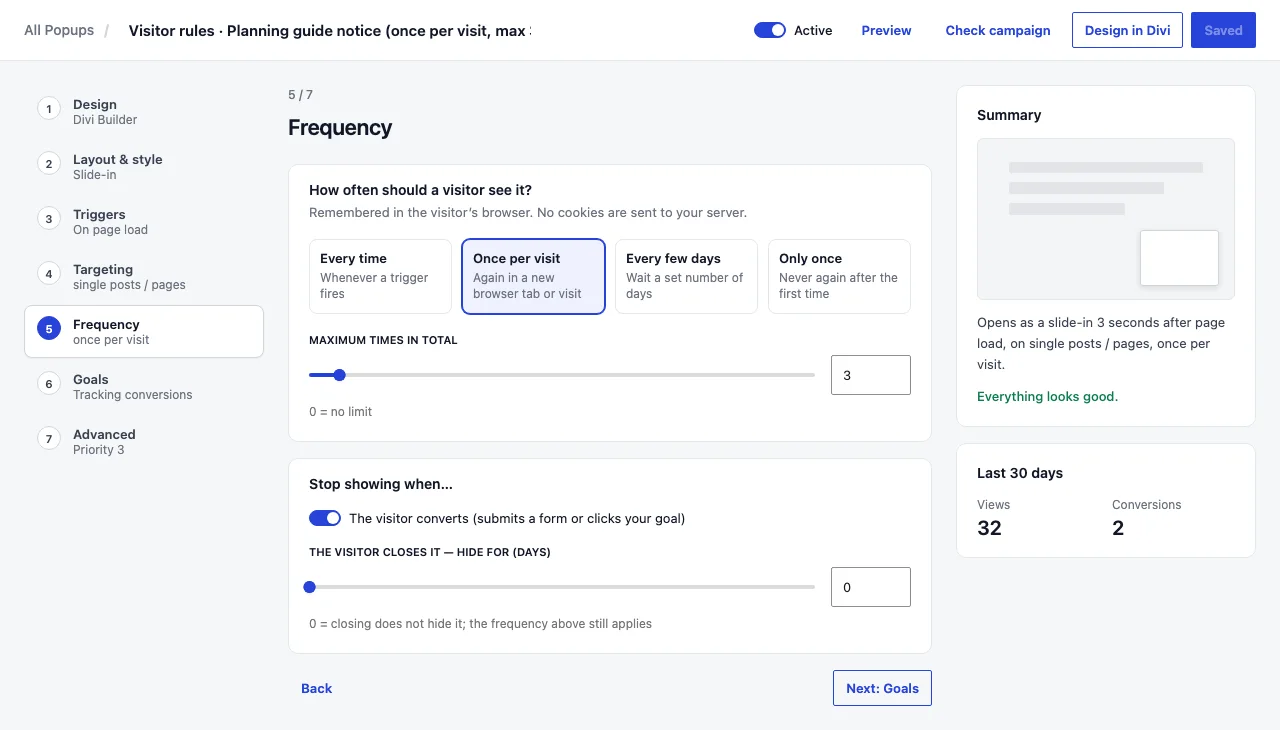
Frequency is one of several gaps between the two approaches; native Divi 5 popups vs Divi Smart Popup covers the others.
Frequently asked questions
Why does my “show once” popup appear again?
The visitor is in a private window, on a different browser or device, or has cleared site data. Browser storage is per browser, so “once” always means once per browser.
Why does my popup never appear, even for new visitors?
You have seen it yourself, so your browser remembers it. Test in a private window, or with Divi Smart Popup’s test mode.
Is once per session the same as once per day?
No. A session ends when the tab or browser is closed, which can be minutes or weeks. Use a number of days if you mean a day.
Can I show it once per logged-in user across devices?
Only by storing that on your server against the user account. Browser-based rules, including Divi Smart Popup’s, are per browser by design.
Did this answer the question? No — open a support request