Set up exit intent for phones
Phones have no mouse to leave the window, so classic exit intent never fires. Here is what a mobile exit signal looks like, and how to use it in Divi 5.
Exit intent was invented for desktops: when the mouse pointer moves up and out of the window, the visitor is probably heading for the tab bar or the back button. A phone has no pointer, so that signal does not exist — which is why many exit-intent popups simply never appear on mobile.
Short answer
Not with Divi 5 alone — it has no exit-intent trigger at all. On phones you need a touch equivalent, which Divi Smart Popup provides.
- Divi 5: no exit-intent trigger, on desktop or phone
- Classic exit intent: needs a mouse, so it never fires on touch screens
- Divi Smart Popup: a quick upward scroll after 30% of the page counts as “leaving” on phones (tested)
This page is the setup. For the swipe test, what the touch trigger cannot detect and better triggers for phones, read Does exit intent work on mobile? We tested it.
What “leaving” looks like on a phone
The closest equivalent is a quick upward scroll after the visitor has read part of the page: people flick back to the top to reach the address bar or go back. Timed popups and scroll-depth popups are also useful on mobile, but they fire on reading, not on leaving.
Desktop
The pointer leaves through the top of the window, towards the tabs or Back.
Divi 5: noSmart Popup: yes
Phones and tablets
A quick flick back up after reading part of the page — people reaching for the address bar.
Divi 5: noSmart Popup: yes
Reading, not leaving
Delay and scroll triggers fire on reading. Natively: Load or Viewport Enter.
Divi 5: yesSmart Popup: yes
How to do it in Divi 5
- Design the popup in the Divi 5 Visual Builder with Divi Smart Popup.
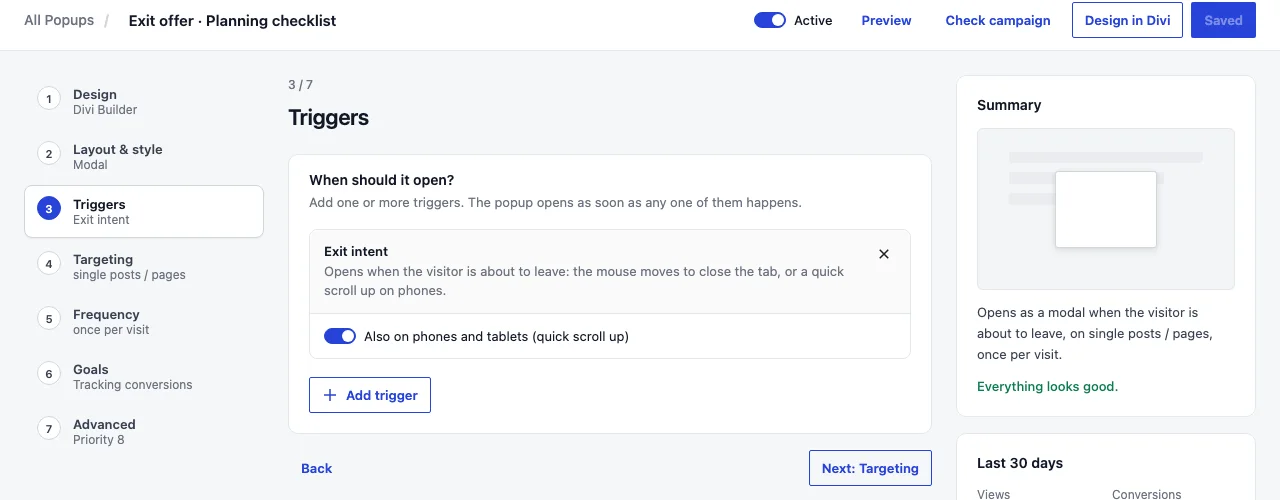
- Set its trigger to Exit intent. On pointer devices it fires when the pointer leaves through the top of the window; on touch devices it fires on a quick upward scroll after part of the page has been read. Touch exit intent is on by default and can be turned off per popup.
- Give it a frequency cap — once per visit, or every few days — so it is not shown on every page.
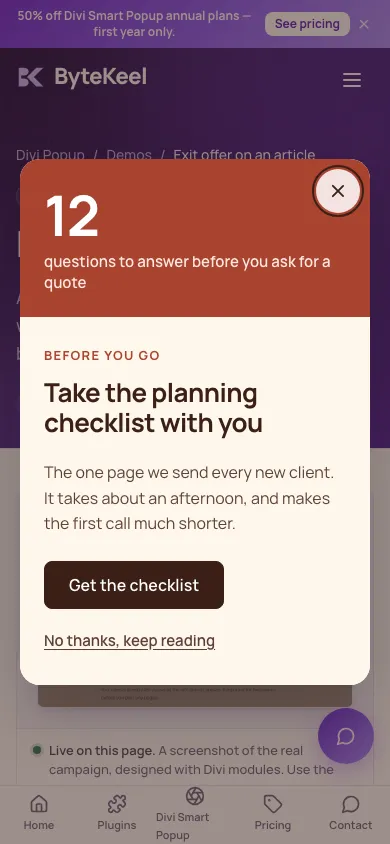
- Choose a placement that suits phones: a bottom bar or a slide-in covers less than a centre modal.
- Use Check campaign on the page to see exactly why the popup would or would not fire for you.
For delay and scroll triggers, and what Divi 5 can do without a plugin, see Divi popup triggers: delay, scroll and exit intent.
Where Divi Smart Popup fits
Exit intent that works where most of your visitors are
Divi 5 has no way to react to a visitor leaving. Divi Smart Popup adds exit intent for desktop and touch, with frequency caps so it doesn’t repeat on every page.
- Desktop and phone exit intent from one trigger
- Once per visit, every few days or only once
- Bottom bars and slide-ins that suit small screens
See Divi Smart PopupTry the live demos
Try it on the exit offer demo on your phone.
How this fits with the rest of Divi’s native popup features: native Divi 5 popups vs Divi Smart Popup.
Frequently asked questions
Does exit intent work on mobile?
Classic exit intent does not, because it needs a mouse. Divi Smart Popup uses a touch equivalent — a quick upward scroll after reading part of the page — so the same popup works on phones and desktops.
Can I use exit intent on desktop only?
Yes. Turn off touch exit intent on the popup and it fires only for pointer devices.
How do I stop it showing every time?
Set a frequency cap: once per visit, every few days, or only once. The history is kept in the visitor’s browser, with no cookie and nothing sent to ByteKeel.
Did this answer the question? No — open a support request