In short:
- Once per visit means per tab: in our five-tab test the popup showed once in each new tab, not on a reload.
- Add a total cap: with a maximum of 3, the popup never showed again after the third time.
- Several popups stacking up: set the site-wide limits in Popups › Settings.
- Native Divi 5: one rule only, a cookie that hides the popup for 365 days after a close.
Why does my Divi popup keep showing?
A Divi popup keeps showing because nothing tells it to stop. A native Divi 5 popup opens on every page view its trigger fires on, and a plugin popup set to Every time does the same.
The subtler case is "once per visit": visitors who open many tabs can see the popup far more often than you expect.
The fastest way to cap a Divi popup
We built Divi Smart Popup at ByteKeel so that "how often" is one step in the popup editor. Its Check campaign button opens a test mode with its own history, showing which frequency rule applies without using up your real cap.
You can try it on a private WordPress in the ByteKeel playground. If you are building natively in Divi 5 without a plugin, here is how to limit the popup by hand.
How to limit a native Divi 5 popup without a plugin
Divi 5 can hide a popup after it is closed, but only for a year at a time. On a popup built as a hidden section with Interactions:
- Set a cookie on close: on the close button, add a Click interaction with Add Cookie, for example
popup_closed = 1. - Add a condition: on the popup section, add a Cookie condition set to display only if the cookie does not exist.
- Test in a private window: close the popup once, then reload. The section is no longer printed.
- Check your page cache: Divi checks the condition on the server, so a full-page cache can serve the popup to people who already have the cookie.
In Divi 5.2 the cookie lasts 365 days, with no field for a day, a week or a visit. For anything finer, this script in a script tag in Divi › Theme Options › Integration shows a hidden .my-offer section after three seconds, at most once every seven days:
( function () {
	var key = 'my-offer-seen';
	var days = 7;
	var last = 0;
	try { last = parseInt( localStorage.getItem( key ), 10 ) || 0; } catch ( e ) {}
	if ( Date.now() - last < days * 86400000 ) {
		return;
	}
	setTimeout( function () {
		var box = document.querySelector( '.my-offer' );
		if ( ! box ) { return; }
		box.style.display = 'block';
		try { localStorage.setItem( key, String( Date.now() ) ); } catch ( e ) {}
	}, 3000 );
}() );
For once per visit, use sessionStorage and drop the day check. Our guide Show a Divi popup only once per visitor explains each variant and the privacy side.
The frequency rules you can set in Divi Smart Popup
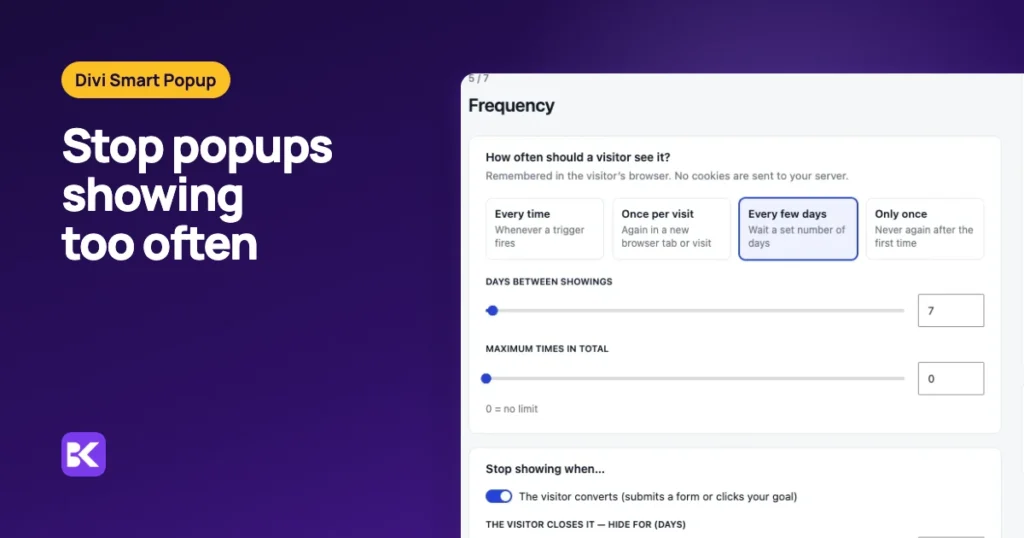
Each popup has a Frequency step with four modes and three extra limits. Once per visit is the default.

| Setting | What it does |
|---|---|
| Every time | Shows whenever a trigger fires. Only sensible for click-opened popups. |
| Once per visit | Once per browser tab. A new tab or a new visit can show it again. |
| Every few days | Waits a set number of days after the last showing. |
| Only once | Never again after the first showing in that browser. |
| Maximum times in total | A hard cap across all visits (0 means no cap). |
| Stop after a conversion | Never again once the visitor submits a form in it or clicks your goal. |
| Hide after close | Closing it hides it for a number of days, on top of the mode above. |
Every option is listed in the frequency caps reference.
What does "once per visit" mean? Our five-tab test
Once per visit means once per browser tab. On our demo site, the "visitor rules" popup opens three seconds after page load, once per visit, with a maximum of 3 times.
We opened its page in headless Chrome in five tabs, one after another, with one browser profile, as a returning visitor would, and reloaded the first tab. Each time we waited five seconds and recorded what showed and what was stored.
| Visit | Popup shown? | Times shown so far (stored) |
|---|---|---|
| Tab 1 | Yes | 1 |
| Tab 1, reloaded | No: same visit | 1 |
| Tab 2 | Yes | 2 |
| Tab 3 | Yes | 3 |
| Tab 4 | No: cap reached | 3 |
| Tab 5 | No: cap reached | 3 |
- A visit is a browser tab: a reload or another page in the same tab is the same visit; a new tab is a new visit. For tab-heavy visitors, add a cap or use Every few days.
- The total cap is absolute: after three showings the popup stayed away for good in that browser, whatever the mode said.
Where is the popup count stored?
Divi Smart Popup stores the count in the visitor's own browser, in local storage, under a key named after the popup. After the first showing the stored value was:
d5pe_p20 = {"shown":1, "last":1793818151315, "converted":false, "hideUntil":0}- No cookies sent: nothing goes to your server, and frequency keeps working on fully cached pages because the browser decides.
- Per browser and device: one person on a phone and a laptop is two visitors, and clearing site data starts again.
- Blocked storage: if the browser blocks storage, the limits only apply within one page view.
How do I stop several popups showing in one visit?
Use the site-wide limits, because per-popup caps do not stop three different popups in one visit. Popups › Settings limits all popups opened automatically (by page load, scroll, exit intent and similar):
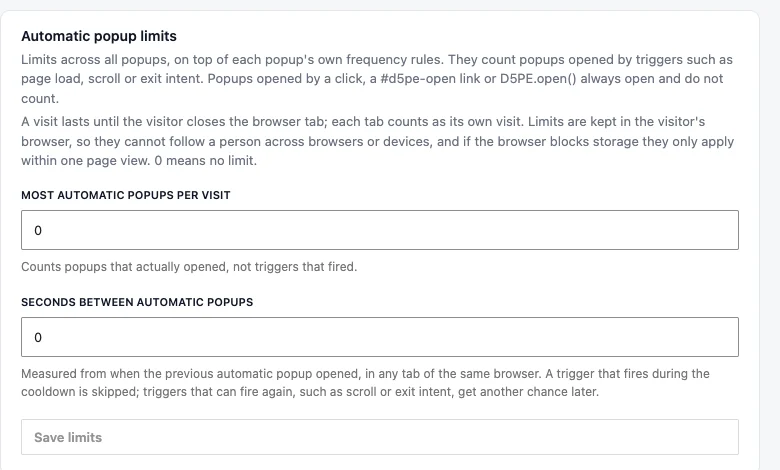
- Most automatic popups per visit: for example 1.
- Seconds between automatic popups: measured across all tabs of the same browser, for example 300.
Popups opened by a click or a #d5pe-open- link always open and do not count. Only one modal shows at a time; the higher priority (Advanced step) wins and the other waits.
Native Divi 5 vs Divi Smart Popup for popup frequency
Native Divi 5 hides a popup for a year after a close; Divi Smart Popup adds the other rules.
| Criterion | Native Divi 5 | Divi Smart Popup |
|---|---|---|
| Once per visit, every few days | Only with your own script | Built-in modes |
| Hide after close | Cookie, fixed at 365 days | Any number of days |
| Stop after a sign-up | No | Yes, on by default |
| Limits across popups | No | Per visit and seconds between |
| Behind a page cache | Cookie condition checked on the server | Decided in the browser |
| Cost | Free with Divi 5 | $29 a year for one site |
When you do not need Divi Smart Popup: your popup only opens on click, or hiding it for a year after a close is the only rule you want. Native Divi 5 does that for free.
Frequency settings that work well
Match the cap to the job of the popup. These are starting points:
| Popup | Mode | Extra limits |
|---|---|---|
| Newsletter sign-up | Every 7–14 days | Stop after conversion; hide 30 days after close |
| Exit offer | Once per visit | Maximum 3; stop after conversion |
| Cookie or legal notice | Only once | Stop after the accept click (set it as the goal) |
| Sale announcement bar | Once per visit | Schedule it to the sale dates |
| Contact drawer opened from a button | Every time | None needed: it only opens on click |
How to keep a popup from nagging after launch
Four habits keep a popup welcome:
- Test in a private window: your own browser has already used up its cap.
- Pair a mode with a cap: once per visit plus a maximum covers visitors who open many tabs.
- Set a site-wide limit: one automatic popup per visit is a sensible start.
- Watch Analytics: if many views end in a close and few in a conversion, show it less often or on fewer pages.
To set up a capped popup from scratch, follow Build a Divi 5 popup campaign without code, or compare plans on the Divi Smart Popup page.
Frequently asked questions
Why does my Divi popup never show for me?
You have probably used up your own cap. Use a private window, or select Check campaign: test mode keeps its own history and tells you which rule applies.
Why does my popup show on every page?
The mode is Every time, or the visitor opens each page in a new tab. Switch to Every few days or add a maximum.
Why does the popup ignore the cap when I click a button?
That is intended. A click is a request from the visitor, so popups opened by a click, a link or a click trigger are not limited.
Can a native Divi popup show only once per visit?
Not without code. Divi 5's only no-code rule is a cookie that hides the popup for 365 days after a close. Once per visit needs a short sessionStorage script or a plugin.
More about Divi Smart Popup
-

Best Divi 5 popup plugin? Compared by use case
Divi 5's Interactions handle click-to-open popups for free. Once a popup should open by itself, on chosen pages and not on every visit, a plugin earns its place. Here is how the…
-

Build a Divi 5 popup campaign without code
Divi 5 opens a popup on click, but cannot decide when one opens by itself, where, or how often. Build the native click popup, then a full campaign in the Divi Builder.
Leave a Reply