Filename-based alt text vs AI vision
File-name alt text is free, instant and private; AI vision describes the picture but costs a request and needs review. Real examples and how to choose.
Short answer
Filename-based alt text rewrites the file name, so blue-linen-tote-bag.jpg becomes “Blue Linen Tote Bag”. AI vision sends the image to a model that describes what it sees. The first is free, instant and private but only as good as your file names; the second handles badly named photos but uses a ByteKeel AI credit (or a paid request with your own key) per image and can be wrong.
- File names: no API key, nothing leaves your server, same result every time
- File names: camera names such as IMG_4032.jpg give nothing useful
- AI vision: describes the actual picture, whatever the file is called
- AI vision: uses a credit or a paid request, the image leaves your server for processing, and it needs reviewing
Both methods are in ByteKeel PixTag Pro, and the file-name method is also in the free ByteKeel PixTag. This page shows what each one actually produces, so you can choose per site or combine them.
Checked on 4 November 2026 against ByteKeel PixTag Pro 1.0.4. The file-name examples below are the plugin’s real output with its default rules. We did not run AI examples for this page, so none are shown: an AI result depends on the model, the prompt and the image.
What the file-name method produces
With the default rules ByteKeel PixTag replaces hyphens and underscores with spaces, removes numbers, special characters and the extension, drops the words img, image, photo, picture, file and document, then capitalises each word. Real output:
| File name | Alt text written |
|---|---|
blue-linen-tote-bag.jpg |
Blue Linen Tote Bag |
hero-image-final-v2.jpg |
Hero Final V |
DSC00125.JPG |
Dsc |
PXL_20261003_142210.jpg |
Pxl |
IMG_4032.jpg |
(nothing) |
screenshot-2026-10-03-at-14.22.10.png |
Screenshot At .. |
So it works well when people name files on purpose, typically product photos and graphics made for the site, and poorly for phone photos and screenshots. The rules can be changed on the Generation Rules tab, and a template can add the post title or category, which helps a lot on shops: see use the product name as alt text for WooCommerce images.
What AI vision does
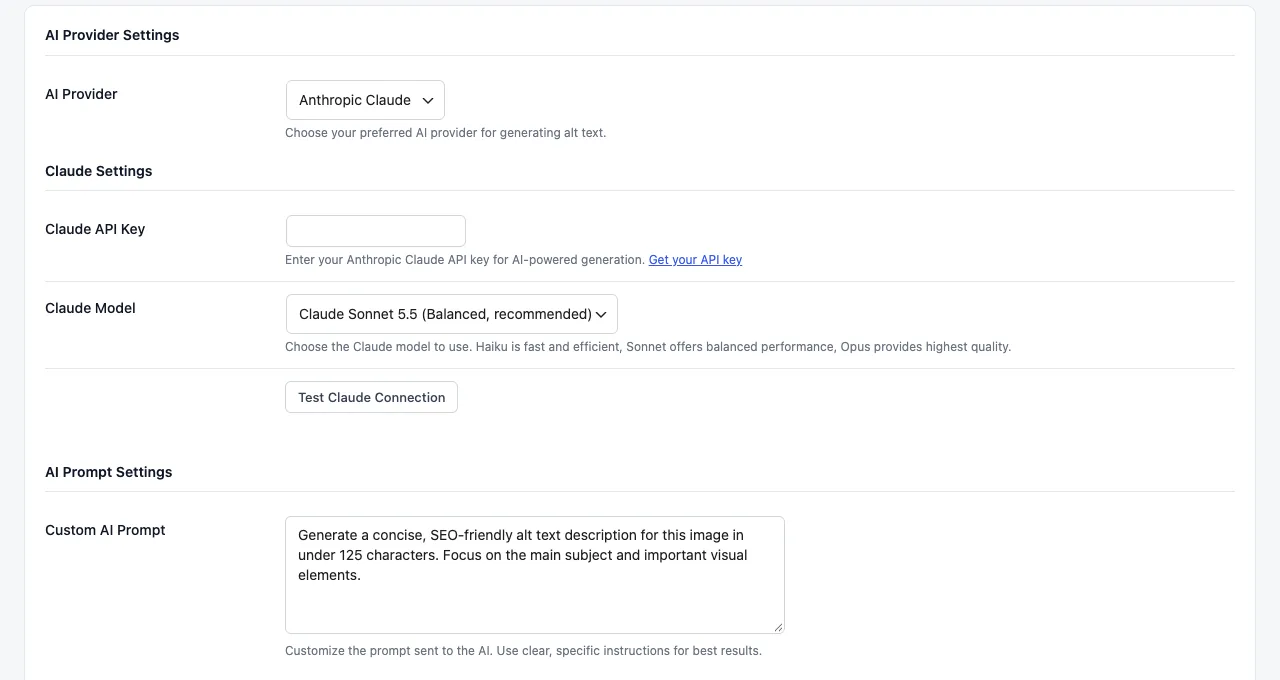
With the AI-powered method, ByteKeel PixTag Pro sends the image and your prompt to the provider you choose on Settings › Generation Rules, and saves the short description it returns. The default prompt asks for a concise description under 125 characters that focuses on the main subject.
- OpenAI (GPT-4o Mini by default, or GPT-4o, GPT-4.1 Mini, GPT-4.1) receives a link to the “large” size of the image, so OpenAI must be able to download it from your site. That fails on local and password-protected sites.
- Anthropic Claude (Claude Sonnet 5.5 by default, or Haiku 5.5 or Opus 5.5) receives the image file itself, read from your server, so it also works on local and staging sites.
- With ByteKeel AI each image uses one of your plan’s credits. With your own key, every image is one request billed to your account by the provider, and a result is cached for an hour, so a preview followed by a real run does not pay twice for the same images.
- If a request fails or the provider refuses the image, ByteKeel PixTag Pro uses the file name instead, and the activity log says so.
Side by side
| File name | AI vision | |
|---|---|---|
| Input | The file name (and, with a template, post data) | The picture itself and your prompt |
| Well-named product photos | Good | Good, sometimes more detail than needed |
| Phone photos, screenshots | Poor or empty | Good |
| Cost | Free | One ByteKeel AI credit, or one paid request with your own key |
| Privacy | Nothing leaves your server | The image is sent for processing (ByteKeel AI or your own provider) |
| Needs an API key | No | Not with ByteKeel AI; yes for your own provider |
| Same result every time | Yes | Not guaranteed |
| Can be wrong about the content | Only if the name is wrong | Yes: review the results |
| Available in | ByteKeel PixTag (free) and ByteKeel PixTag Pro | ByteKeel PixTag Pro |
Combine them with Hybrid
ByteKeel PixTag Pro’s Hybrid method tries AI first, then your template, then the file name, so an image always gets something. Use it when most of the library is badly named but an API failure should not leave gaps. If you mostly upload well-named product images, file names or a template are usually enough and cost nothing.
How to choose
- Look at the file names in Media › Library. If most of them already describe the picture, start with the file-name method.
- If many are
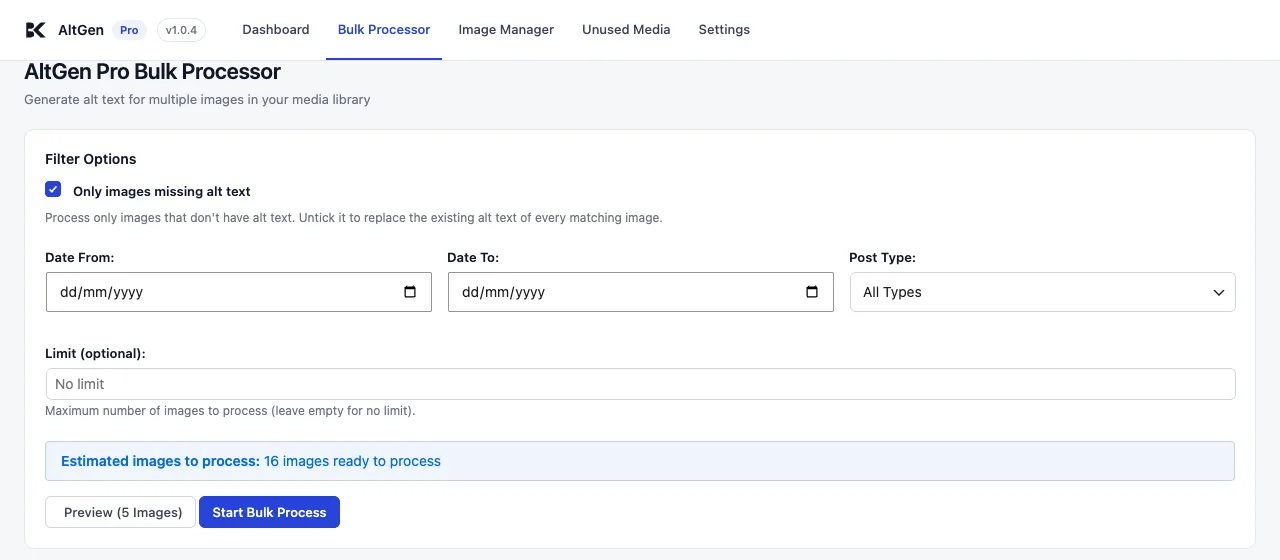
IMG_…,DSC…orScreenshot…, connect a provider (Connect OpenAI or Claude) and switch to AI-powered or Hybrid. - Run Preview (5 Images) in the Bulk Processor with each method and compare. Preview does not save anything.
- Use the Image Manager to correct the few results that are wrong, and clear the alt text of decorative images: neither method can tell that an image is decorative.
Where ByteKeel PixTag fits
Both methods in one plugin
ByteKeel PixTag writes alt text from file names and templates for free. ByteKeel PixTag Pro adds AI vision with ByteKeel AI or your own OpenAI or Claude key, Hybrid fallback, bulk filters and an image manager.
- File-name and template methods without an API key
- ByteKeel AI or your own OpenAI / Claude key, with a file-name fallback
- Preview five images before a bulk run
Frequently asked questions
Is AI alt text better than file-name alt text?
For photos with meaningless file names, usually yes, because it looks at the picture. For well-named product images the difference is small, and file names cost nothing and never leave your server.
Is filename-based alt text bad for SEO or accessibility?
Not when the file name describes the image. It becomes a problem when names are camera codes or contain words like “final” or “v2”, which then end up in the alt text. Check a few results after setup.
Does AI alt text work on a local or staging site?
With Anthropic Claude, yes, because ByteKeel PixTag Pro sends the file itself. OpenAI needs to download the image from a public URL, so it fails on local and password-protected sites.
Did this answer the question? No — open a support request