Bulk processor settings
Fill in missing alt text for existing WordPress images in bulk with ByteKeel PixTag Pro: filter by date, post type and limit, preview five, then pause or cancel.
ByteKeel PixTag Pro’s Bulk Processor fills in alt text for images that are already in your Media Library, in batches, with the method you choose: file names, a template, AI vision or Hybrid. You pick which images, preview five results without saving, then run it with pause and cancel.
For a step-by-step guide that compares free and Pro bulk runs on a test library, see How to bulk add missing alt text in WordPress.
Pick the images
Open ByteKeel PixTag Pro › Bulk Processor. Under Filter Options:
- Only images missing alt text — keep it ticked to leave existing alt text untouched.
- Date From / Date To — the upload date range.
- Post Type — only images attached to posts of that type (for example Products). Leave All Types to include images that are not attached to anything.
- Specific Posts (optional) — after choosing a post type, hold Ctrl/Cmd to pick individual posts.
- Limit (optional) — the most images to process this run. Useful for a first AI run.
Estimated images to process updates as you change the filters.
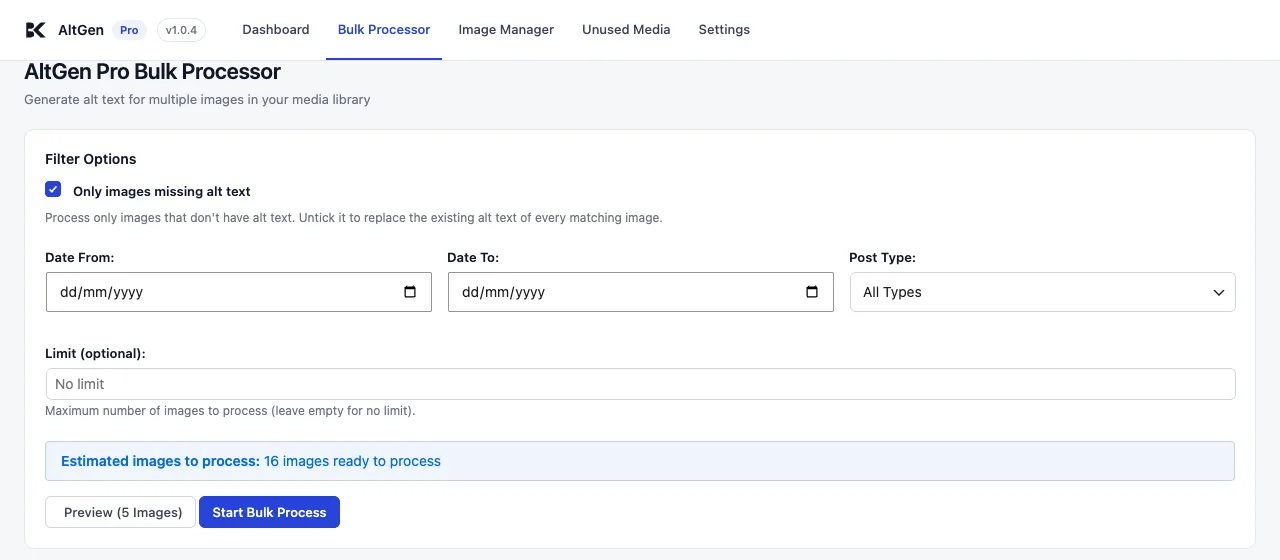
Preview, then run
- Select Preview (5 Images). ByteKeel PixTag Pro generates text for the first five matching images and shows it without saving anything.
- If it looks right, select Start Bulk Process.
- The progress panel shows Processed, Successful, Failed, time remaining and the file being worked on. Pause stops after the current batch; select it again to resume. Cancel ends the run.
Images are sent in batches (20 by default — see Advanced tab). The work is driven by your browser, so keep the tab open until it finishes.
With the AI method, each image uses one ByteKeel AI credit, or, with your own key, one request billed to your API account. Preview results are kept for an hour, so starting the run soon after a preview does not pay twice for those five.
Other ways to generate
For a handful of images, use the Media Library tools instead — see Generate alt text from the Media Library.
Which method to run depends on your file names: filename-based alt text vs AI vision compares them with real examples. The free ByteKeel PixTag has a simpler bulk tool, described in ByteKeel PixTag Bulk Processor and Media Library tools, and new uploads can be handled for you: see automatically generate alt text in WordPress.
Did this answer the question? No — open a support request